
Australian hospitality venues and retail merchants operate in a high-wage, fast-paced environment where clunky legacy cash registers, disconnected kitchen printers, and out-of-sync stock spreadsheets eat...
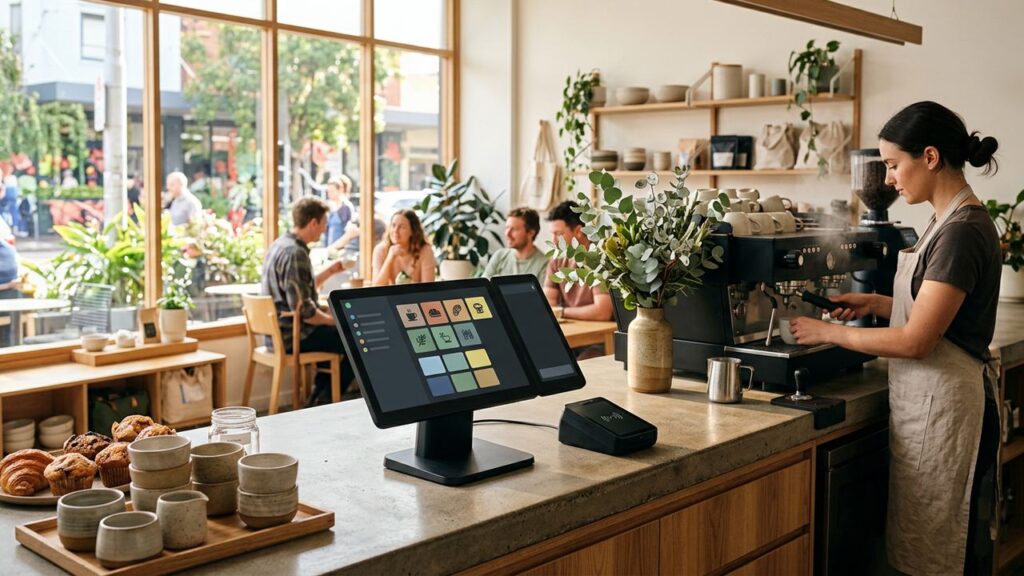
Australian hospitality venues and retail merchants operate in a high-wage, fast-paced environment where clunky legacy cash registers, disconnected kitchen printers, and out-of-sync stock spreadsheets eat directly into weekly store profits. Moving operations onto POSApt’s Cloud POS system unifies counter checkouts, QR table ordering, kitchen display workflows, barcode inventory tracking, and real-time multi-store analytics inside one accessible cloud hub. Rather than chaining owners to a back-office PC to reconcile nightly Z-reads, POSApt’s Cloud POS system lets operators track live sales, staff performance, and stock velocity from any authorized device anywhere.
Built specifically to serve both busy hospitality formats (restaurants, cafés, bars, takeaway shops, food trucks, and quick-service outlets) and diverse retail categories (clothing boutiques, gift shops, convenience stores, bottle shops, grocers, and multi-site chains), POSApt’s Cloud POS system replaces fragile multi-vendor patches with one coherent commerce foundation. Examining its core architecture, sector workflows, hardware readiness, and margin impact helps Australian operators evaluate whether migrating to POSApt’s Cloud POS system fits their growth stage.
Why Australian Venues Are Retiring On-Premise Legacy POS Registers
Traditional server-bound point-of-sale terminals required heavy upfront hardware outlays, manual software update discs, rigid local server backups, and painful after-hours calls whenever a register froze during Friday dinner rush. Worse still, legacy tills rarely connected cleanly to modern consumer habits like QR code table ordering, commission-free direct online pickup, digital loyalty wallets, or real-time multi-branch inventory transfers.
Migrating to POSApt’s Cloud POS system eliminates those single-machine bottlenecks immediately. Menu price tweaks, seasonal specials, happy-hour modifiers, or multi-store retail promotions publish centrally across every connected terminal in seconds. Because transaction data synchronizes securely to cloud storage in real time, owners gain instant visibility into live store revenue, peak-hour labor ratios, and top-selling SKUs without waiting for end-of-week manual exports.
Unified Cloud Architecture Serving Hospitality and Retail Under One Roof
Many cloud point-of-sale vendors build strictly for simple cafés or strictly for boutique apparel shops, forcing hybrid venues (such as a café selling packaged specialty beans, bakery retail goods, and seated brunch, or a gourmet grocer running a hot takeaway counter) to juggle two separate registers. A core strength of POSApt’s Cloud POS system is native versatility across both hospitality and retail workflows from a unified administrative console.
Core Operational Modules Built Into POSApt’s Cloud POS System
Whether deployed inside a single suburban espresso bar or across ten metropolitan retail branches, POSApt’s Cloud POS system brings eight essential operational tools together cleanly:
- Intuitive Touchscreen Checkout: Fast item tiling, split bills, custom modifiers, EFTPOS integration, and short staff onboarding curves during high-turnover seasons.
- Real-Time Cloud Reporting: Live sales dashboards tracking gross revenue, GST summaries, payment splits, hourly peaks, and margin trends from laptop, tablet, or smartphone.
- Hospitality Floor and Table Management: Visual interactive floor maps tracking open tables, course timing, seat transfers, and quick bill splitting.
- Kitchen Display System (KDS) and Docket Routing: Instant digital order routing to bar, grill, or cold-prep stations, eliminating lost paper tickets and misread handwriting.
- QR Code Table Ordering and Commission-Free Online Ordering: Letting diners browse digital menus, customize extras, and pay seamlessly while lifting average check size without steep third-party marketplace cuts.
- Retail Barcode Scanning and Live Inventory Control: High-speed UPC/EAN scanning, low-stock alerts, supplier purchase ordering, and multi-store SKU visibility.
- Promotions, Bundles, and Customer Loyalty: Automated combo discounts, member points, gift vouchers, and targeted repeat-visit rewards.
- Centralized Multi-Store Management: Single back-office control pushing catalog updates, pricing tiers, and consolidated analytics across multiple Australian sites.
Hospitality vs. Retail Workflows Inside POSApt’s Cloud POS System
Because a fast-moving burger QSR operates nothing like a multi-size fashion store or neighborhood bottle shop, mapping how POSApt’s Cloud POS system adapts to distinct floor environments highlights where venues recover the most labor hours and checkout speed.
| Venue / Store Segment | Primary Floor Bottleneck | Key Capabilities in POSApt’s Cloud POS System | Direct Commercial Payoff |
|---|---|---|---|
| Full-Service Restaurants & Bars | Slow table turns, split-bill bottlenecks, kitchen miscommunication | Interactive table maps, KDS routing, tableside modifiers, bill splitting | Faster table turnover, fewer comped kitchen errors, calmer service |
| Cafés, Bakeries & QSR / Takeaway | Morning rush queues and complex drink/meal customizations | Rapid modifier keys, QR & online pre-ordering, integrated loyalty | Shorter queues, higher repeat morning visits, zero app-commission drain |
| Food Trucks & Pop-Up Venues | Compact counter space and mobile connectivity flexibility | Lightweight cloud tablet POS, fast digital receipts, live remote tracking | Agile festival setup with clean end-of-day GST reconciliation |
| Clothing, Gift & Specialty Retail | Size/color variant tracking and seasonal markdown management | Barcode scanning, variant inventory matrices, automated promo rules | Accurate stock counts, faster stocktakes, higher basket size |
| Grocery, Convenience & Bottle Shops | High SKU counts, multi-buy deals, fast lane throughput | High-speed barcode lanes, pack/case promos, supplier reorder alerts | Zero checkout lag, reduced shrinkage, smart replenishment |
Protecting Venue Margins Through Direct Ordering and Smarter Stock Control
For Australian hospitality operators in particular, rising ingredient costs, penalty rates, and third-party delivery app commissions (frequently 25 to 35 percent per order) squeeze net profit hard. Pairing counter service with the built-in online ordering and QR table ordering capabilities inside POSApt’s Cloud POS system shifts regular local diners onto commission-free direct channels while letting diners add sides, drinks, and desserts effortlessly without waiting to wave down busy floor staff.
On the retail side, accurate barcode-level inventory tracking prevents two silent cash killers: running out of best-selling core sizes during weekend peaks and over-ordering slow-moving stock that ties up working capital. Modeling how trimming 2 percent in shrinkage, cutting third-party commissions, and lifting average ticket value improves monthly net profit inside a practical profit margin calculator illustrates why modernizing onto POSApt’s Cloud POS system pays back quickly.
Multi-Store Scaling Without Multiplying Back-Office Admin
Opening a second or third store is often where legacy POS setups snap. Manually logging into three separate store servers to adjust coffee prices, audit daily cash variances, or check whether store B has spare stock of a sold-out SKU wastes hours every week. POSApt’s Cloud POS system centralizes catalog governance, staff permission roles, and cross-branch reporting into one clean dashboard so owners can expand across Melbourne, Sydney, Brisbane, or regional hubs using one repeatable operational playbook.
Cloud POS vs. Legacy On-Premise Register Total Cost Comparison
When comparing quotes, Australian owners should examine three-year total cost of ownership across hardware, software maintenance, online ordering add-ons, and staff training time rather than staring strictly at month-one checkout fees.
| Cost & Operations Factor | Legacy On-Premise POS Register | POSApt’s Cloud POS System |
|---|---|---|
| Upfront Capital Expense | Heavy proprietary server + terminal purchase upfront | Predictable SaaS subscription + flexible modern POS hardware |
| Software & Security Updates | Manual paid technician visits or outdated unpatched terminals | Automatic cloud updates with zero local server upkeep |
| Remote Owner Visibility | Must physically sit at back-office register to pull reports | Live mobile and browser reporting from anywhere |
| Online / QR Ordering Sync | Clunky separate tablets requiring manual re-keying into till | Unified direct menu, order, and KDS sync inside one system |
| Multi-Store Expansion Speed | Weeks of manual database cloning per new site | Clone menus, tax settings, and catalogs to new stores rapidly |
Six Practical Steps for a Stress-Free Migration to POSApt’s Cloud POS System
Switching registers mid-trade sounds intimidating to any venue manager, yet disciplined preparation makes cutover smooth and calm. Follow this six-step launch checklist when onboarding POSApt’s Cloud POS system:
- Clean Your Product and Menu Master Sheet First: Before uploading CSV files into POSApt’s Cloud POS system, archive discontinued dishes or dead retail SKUs, standardize GST tax codes cleanly, and double-check modifier prices and barcode formats.
- Verify Local Network and Hardware Readiness: Confirm stable primary Wi-Fi or wired Ethernet for main registers and kitchen printers running POSApt’s Cloud POS system, configure a simple 4G/5G failover router for uninterrupted EFTPOS continuity, and test barcode scanners and cash drawers thoroughly.
- Map Kitchen Routing and Floor Plans Accurately: Mirror exact table numbers, bar vs. hot-kitchen printer stations, and KDS bump screens inside POSApt’s Cloud POS system so chefs see familiar ticket formats from day one.
- Run Hands-On Staff Sandbox Drills: Schedule 45-minute mock rush rehearsals covering split bills, refunds, voids, loyalty redemptions, and online pickup orders inside POSApt’s Cloud POS system so casual weekend staff build muscle memory before real queues form.
- Choose a Calm Mid-Week Cutover Window: Go live with POSApt’s Cloud POS system on a quieter Monday or Tuesday morning rather than Friday night dinner service or a Saturday retail sale, giving supervisors quiet breathing room to verify end-of-day reconciliation.
- Audit First-Week Reports Against Bank Settlements: Cross-check daily EFTPOS batches, cash drawer counts, GST totals, and online order payouts generated by POSApt’s Cloud POS system during week one so accounting sync runs effortlessly thereafter.
Training Casual and Seasonal Staff in Minutes Instead of Days
Hospitality and retail face constant roster rotation across university breaks, holiday peaks, and weekend casual shifts. Clean visual category buttons, prompted modifier flows (automatically reminding baristas to confirm milk choice or chefs to confirm cooking temperature), and role-based discount permissions inside POSApt’s Cloud POS system slash new-hire training time while reducing accidental keying errors and unauthorized voids.
Leveraging Customer Loyalty and Analytics for Repeat Revenue
Acquiring a brand-new walk-in diner or shopper costs far more than encouraging an existing neighborhood customer to visit twice a month instead of once. Built-in customer profiles, loyalty rewards, and purchase-history reporting inside POSApt’s Cloud POS system let local businesses identify their top VIP regulars, spot slow Tuesday afternoon hours ripe for targeted member promos, and refine menus or retail assortments around actual highest-margin sellers rather than gut instinct.
Hardware Compatibility, EFTPOS Flow, and Counter Ergonomics
Software speed means little if cashiers still type payment amounts manually onto standalone EFTPOS pads or wrestle with tangled thermal printers. Deploying POSApt’s Cloud POS system cleanly starts with matching practical counter hardware to your exact trading format. Busy cafés and takeaway bars benefit from sleek dual-screen counter terminals facing both staff and diners, paired with high-speed thermal docket printers or mounted Kitchen Display System (KDS) monitors resistant to kitchen heat and grease.
Retail stores such as clothing boutiques, convenience shops, bottle shops, and regional grocers get maximum lane velocity by pairing POSApt’s Cloud POS system with 1D/2D handheld or omnidirectional desktop barcode scanners, reliable cash drawers, receipt printers, and integrated EFTPOS terminals that eliminate manual mis-keying errors at checkout. Keeping counter footprints compact preserves space for high-margin impulse displays while ensuring POSApt’s Cloud POS system processes peak weekend queues smoothly.
Australian GST Compliance, End-of-Day Reconciliation, and Bookkeeping Clarity
Clean bookkeeping saves Australian small business owners thousands in annual accounting cleanup fees. Every sale, split tender, discount, refund, and GST-free grocery item processed through POSApt’s Cloud POS system logs cleanly into structured daily settlement summaries. Rather than manually sorting crumpled paper Z-tapes every Sunday evening, owners pull accurate daily GST breakdowns, card-versus-cash variance logs, and staff shift summaries directly from POSApt’s Cloud POS system in seconds, making BAS preparation faster and audit-ready.
Seven Questions to Ask During Your POSApt’s Cloud POS System Demo
Before finalizing hardware bundles and rollout dates, walk through seven practical validation checks during a live walkthrough of POSApt’s Cloud POS system:
- Test your exact busiest modifiers (such as custom coffee milk/syrup combos or half-and-half pizza toppings) inside POSApt’s Cloud POS system to confirm checkout stays under five taps.
- Verify how multi-buy retail promotions, bundle discounts, and seasonal clearances schedule automatically inside POSApt’s Cloud POS system without manual cashier overrides.
- Walk through QR table ordering and direct online ordering end-to-end to see orders pop straight onto kitchen screens inside POSApt’s Cloud POS system.
- Inspect multi-store reporting views inside POSApt’s Cloud POS system to confirm you can compare store-by-store margins and stock levels from your phone.
- Confirm integrated EFTPOS provider options, surcharge handling rules, and settlement timing compatible with POSApt’s Cloud POS system.
- Check local Australian support hours across weekend lunch and dinner trading peaks for POSApt’s Cloud POS system.
- Review total onboarding timelines, CSV catalog import assistance, and staff training materials included when launching POSApt’s Cloud POS system.
FAQ’s
What types of businesses can run on POSApt’s Cloud POS system?
POSApt’s Cloud POS system is engineered for both Australian hospitality venues (restaurants, cafés, bars, takeaway shops, food trucks, and QSRs) and retail businesses (clothing boutiques, gift shops, convenience stores, bottle shops, grocery stores, and multi-site retail chains).
Can I check live store sales remotely with POSApt’s Cloud POS system?
Yes. Because transaction, order, and stock data synchronize securely in the cloud, POSApt’s Cloud POS system lets owners and area managers monitor live revenue, top-selling items, payment breakdowns, and multi-store performance from any authorized smartphone, tablet, or laptop anywhere.
Does POSApt’s Cloud POS system support QR table ordering and KDS for hospitality?
Yes. Hospitality deployments using POSApt’s Cloud POS system can combine counter POS terminals with interactive table management, Kitchen Display Systems (KDS), QR code table ordering, commission-free online ordering, and built-in customer loyalty workflows.
How does POSApt’s Cloud POS system help retail stores manage inventory?
Retailers running POSApt’s Cloud POS system gain barcode scanning at checkout, real-time SKU stock tracking across single or multiple stores, promotion and bundle pricing tools, low-stock visibility, and centralized catalog updates from one cloud back office.
How long does it take to switch an existing café or shop onto a cloud POS?
Most single-site cafés, restaurants, or retail stores complete catalog cleanup, hardware setup, menu and KDS configuration, staff sandbox practice, and mid-week cutover onto POSApt’s Cloud POS system within 1 to 2 weeks, while multi-store rollouts typically launch in structured site-by-site phases over 3 to 6 weeks.
What happens if store Wi-Fi drops briefly during busy trading hours?
Smart Australian venues pair cloud POS terminals with wired Ethernet where possible plus an inexpensive automatic 4G/5G cellular failover router so EFTPOS payments, online orders, and POSApt’s Cloud POS system stay continuously synced even if NBN broadband hiccups temporarily.
Conclusion
Modern hospitality and retail success hinges on speed at the counter, zero friction between front-of-house and fulfillment, and live financial clarity every day of the week. Adopting POSApt’s Cloud POS system gives Australian restaurants, cafés, takeaway shops, and multi-site retailers a unified cloud platform connecting touchscreen checkouts, KDS routing, QR and direct online ordering, barcode inventory, loyalty rewards, and remote real-time reporting.
Clean up your catalog and tax codes before cutover, run a calm mid-week launch with practiced staff, pair direct ordering with active margin tracking, and use real-time analytics to double down on your highest-profit menu items and SKUs. With POSApt’s Cloud POS system anchoring daily trade, scaling smoothly from one busy storefront to a thriving multi-venue brand becomes far simpler.