
Policy-Based Routing (PBR) is a technique that lets network administrators decide how traffic moves across a network based on rules they define, rather than on...
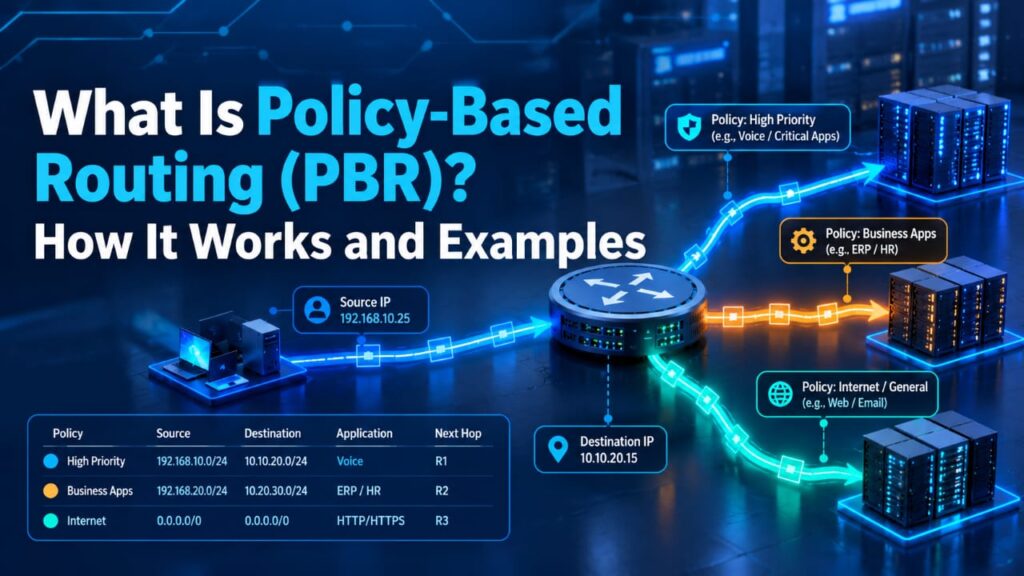
Policy-Based Routing (PBR) is a technique that lets network administrators decide how traffic moves across a network based on rules they define, rather than on the destination address alone. Traditional routing picks the best matching path in the routing table, while PBR adds criteria such as source address, protocol, port number, or packet size. This makes it possible to send guest traffic over a low-cost link, route critical applications over a faster one, or force traffic through a firewall for inspection.
Understanding PBR is valuable for network engineers, system administrators, and IT learners who want to do CCNP Data Center Training and build stronger skills in traffic control, route maps, and data center design. This guide covers how PBR works, how it differs from standard routing, where it is used, and how to configure it with practical examples.
What Is Policy-Based Routing?
Policy-based routing is a technique that forwards packets based on administrator-defined policies rather than only on the destination address. Traditional routing checks a packet’s destination IP and picks the best matching route. PBR adds extra criteria, such as the source address, protocol, port number, or packet size.
For example, an organization might send guest Wi-Fi traffic through a low-cost internet link while business-critical traffic uses a faster, more reliable one. The routing table does not need to change. The policy overrides the normal forwarding decision for the traffic it matches.
Policy-Based Routing vs. Traditional Routing
| Feature | Traditional Routing | Policy-Based Routing |
| Decision basis | Destination IP address | Source, destination, protocol, port, packet size, and more |
| Control level | Low to moderate | High and granular |
| Configuration effort | Minimal | Higher |
| Path selection | Best route in routing table | Administrator-defined path |
| Typical use | General connectivity | Traffic engineering, multi-ISP setups, security steering |
| Performance impact | Minimal | Depends on hardware and platform support |
How Policy-Based Routing Works
PBR follows a simple sequence on most platforms:
- A packet arrives on an interface where a policy is applied.
- The device classifies it using match criteria, usually an access control list (ACL).
- The device applies an action if the packet matches, such as setting a next-hop address or output interface.
- Unmatched traffic follows the regular routing table.
On Cisco devices, this is built with route maps. A route map contains match statements that identify traffic and set statements that define what happens to it. It is then assigned to an interface.
Common Match Criteria
- Source or destination IP address
- Protocol (TCP, UDP, ICMP)
- Port numbers (such as 80, 443, or 5060)
- Packet length
- Incoming interface
Common Actions
- Set the next-hop IP address
- Set the output interface
- Mark packets with DSCP or IP precedence values for quality of service (QoS)
Key Components of PBR
Route maps hold the policy logic and are evaluated in order by sequence number.
ACLs and prefix lists identify which traffic the policy applies to.
Set commands define what the device does with matching traffic.
Interface application attaches the policy to inbound traffic on an interface. Traffic generated by the router itself requires a separate “local policy” setting.
IP SLA tracking monitors the next hop and removes the policy path if it fails, which gives a basic failover mechanism.
Common Use Cases
- Multi-ISP load sharing: Send different user groups or traffic types over different internet providers.
- Department-based routing: Route traffic from specific subnets or VLANs through the paths assigned to them based on department requirements.
- Application-based routing: Send voice, video, or critical applications over higher-quality links.
- QoS marking: Tag packets so downstream devices can prioritize them.
- Security steering: Force traffic through a firewall or inspection device before it leaves the network.
- Cost control: Use lower-cost links for bulk transfers such as backups or software updates.
Policy-Based Routing Examples
The following examples use Cisco IOS syntax. Interface names and addresses are placeholders.
Example 1: Route a Subnet Through a Secondary ISP
Example 2: Steer Web Traffic to a Different Next Hop
Example 3: Mark VoIP Traffic with DSCP
Example 4: PBR with IP SLA Failover
If the next hop becomes unreachable, the router stops using the policy path and returns to normal routing.
Verification Commands
- show route-map
- show ip policy
- debug ip policy (use carefully in production)
PBR on Different Platforms
- Cisco IOS, IOS-XE, and NX-OS: Use route maps applied to interfaces.
- Juniper: Uses filter-based forwarding with firewall filters.
- Linux: Uses ip rule and multiple routing tables.
- Cloud platforms: AWS and Azure offer route tables and user-defined routes with similar intent.
- SD-WAN: Many products offer application-aware policies that serve a comparable purpose.
Advantages of Policy-Based Routing
- Fine-grained control over traffic paths
- Better use of available links and bandwidth
- Support for QoS and security design
- Flexibility in multi-link environments
Limitations and Challenges
- Complexity: More policies mean more to manage and document.
- Performance: Software-based PBR can raise CPU usage on some devices.
- Troubleshooting: Overlapping policies can make problems harder to trace.
- Asymmetric routing: Return traffic may take a different path, which can disrupt stateful firewalls.
- Scalability: Large rule sets can become difficult to maintain.
Best Practices
- Keep policies simple and document each one.
- Use specific ACLs so only intended traffic is matched.
- Test in a lab or maintenance window before production rollout.
- Add IP SLA tracking for failover.
- Review policies regularly as the network changes.
- Prefer platforms with hardware-supported PBR.
Frequently Asked Questions
Does PBR override the routing table?
For matching traffic, yes. Unmatched traffic uses the routing table as usual.
Can PBR work with dynamic routing protocols?
Yes. PBR works alongside protocols such as OSPF and BGP. It only changes forwarding for traffic that matches the policy.
Does PBR affect device performance?
It can, depending on the hardware. Modern platforms handle PBR in hardware, while older or software-based implementations may add CPU load.
Conclusion
Policy-Based Routing gives network teams precise control over how traffic travels, going beyond the destination-only decisions of traditional routing. By matching traffic on source address, protocol, or port and applying actions such as setting a next hop or marking packets for QoS, PBR helps reduce costs, improve application performance, and strengthen security. Because it adds complexity, success depends on clear documentation, specific ACLs, IP SLA tracking for failover, and thorough testing before deployment.
For network engineers, administrators, and IT learners looking to gain hands-on experience with PBR, route maps, and related data center technologies, a CCNP Data Center Course turns these concepts into practical skills. With a solid grasp of how policies interact with the routing table, you can design networks that are more flexible, efficient, and secure.