
AI video had one stubborn flaw for years. The clips looked good, yet they broke the rules of the real world. Feet slid across floors....
AI video had one stubborn flaw for years. The clips looked good, yet they broke the rules of the real world. Feet slid across floors. Objects drifted. Hands melted. Seedance 2.0 targets that flaw directly, and the shift matters for anyone who makes video for a living.
ByteDance released the model in February 2026. It comes from the same company that runs TikTok, so the video pedigree is real. This guide covers what the model does, how you reach it, and where it still falls short.
What Seedance 2.0 Actually Is
Seedance 2.0 is ByteDance’s video generation model. It sits in the Seedance family, which began with version 1.0 in 2025 and moved through 1.5 Pro.
The core change is the architecture. ByteDance calls it a unified multimodal audio-video joint generation system. That sounds dense, so here is the plain version. Sound and picture are made together in one process. They are not made apart and then lined up later.
That single design choice drives most of the gains. Audio lands on the right frame because it was never separate. A footstep hits when the foot lands. A voice matches the mouth without a sync pass.
The model went into public beta for enterprise users on Volcano Engine in April 2026. Creators reach it through consumer platforms instead, and Pippit is one of them.
Four Input Types, Not One
Older video models took a text prompt. Maybe an image too. That was the whole menu.
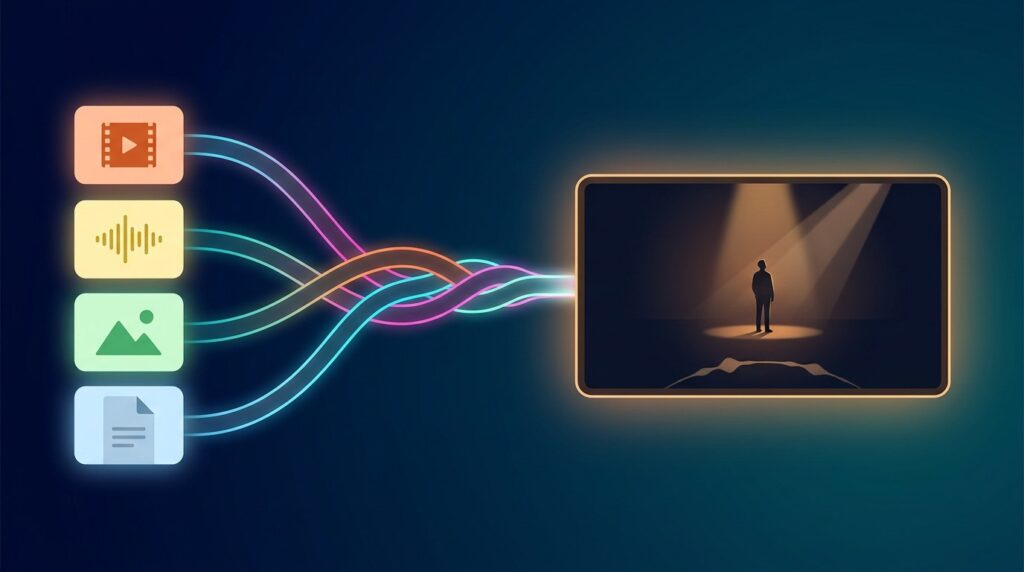
Seedance 2.0 accepts four kinds of input: text, image, audio, and video. Better still, you can mix them in one request. ByteDance lists the ceiling as nine images, three video clips, and three audio clips, plus your written instructions.
This changes how you work. You are no longer describing a shot in words alone. Instead, you show the model what you mean.
Say you have a product photo, a reference clip with a camera move you like, and a music bed. Feed all three in. The model can pull composition from the photo, camera motion from the clip, and rhythm from the track. It then builds a new scene that honours each one.
ByteDance says the model can even read a text-based storyboard. For an ad team, that is the interesting part. You stop hunting for stock footage that almost fits. You supply your own references and direct instead.
Physics That Hold Up
Motion realism is the headline claim for Seedance 2.0, and it is the hardest thing to fake.
ByteDance points to pair figure skating as its showcase. Two skaters take off together, spin in the air, and land on ice. Timing has to be exact. Bodies have to interact without passing through each other. Gravity has to look right on the way down.
Complex interaction between multiple subjects broke earlier models badly. This one holds together far better. Cloth falls with weight. Light shifts as a subject turns. Contact between a character and the ground stays believable.
Close-up work benefits most. Small details betray AI video faster than big ones. So tighter shots and subtle motion are where the improvement shows.
Sound Made With the Picture
Native audio is the second pillar of Seedance 2.0. The model produces stereo output through two-channel technology, not flat mono.
It also runs several audio tracks at once. Background music, ambient effects, and character dialogue can all come out of one generation. Each stays aligned to what happens on screen.
Foley detail is surprisingly fine-grained. ByteDance cites examples like a fingertip on frosted glass, fabric rustling, and bubble wrap popping. These small sounds carry a scene. Silence reads as fake almost immediately.
Native output length runs to about 15 seconds of multi-shot audio and video. That fits social formats neatly. It is short for anything longer, though, which the next version addressed.
Editing and Extension Without Starting Over
Here is a practical frustration with most AI video. You get a clip that is ninety percent right. One detail is wrong. So you re-roll the whole thing and lose everything you liked.
Seedance 2.0 supports targeted editing instead. You can change a specified clip, a character, an action, or a story beat. The rest stays put.
Video extension works the same way. You prompt for what happens next, and the model continues the shot. Characters and setting carry over. In effect, you keep shooting rather than starting a new take.
Camera work is also promptable. The model plans shot language from your instructions, so you can ask for a push-in or a tracking move in words.
Using Seedance 2.0 Through Pippit
Pippit is one route to Seedance 2.0 for everyday creators, and its flow is short.
First, sign in with a Google, TikTok, or Facebook account. Then open “Video generator” in the left panel and type your concept into the prompt field.
Second, load your material. Use “Add media and more” for images, clips, URLs, or documents. Pick your model from the list, which includes Seedance 2.0 alongside other options. Then open “Customize video settings” to set duration and spoken language, and hit generate.
Third, refine and ship. “Edit more” opens an editor for backgrounds, subtitles, text overlays, trims, and filters. Afterwards you download the file or publish straight to TikTok, Instagram, or Facebook.
Pippit lists some useful specifics. It cites 2K output, roughly 30% faster generation than the previous version, and clips up to three times longer. It also offers six aspect ratios: 16:9, 9:16, 4:3, 3:4, 21:9, and 1:1. Reference support covers up to nine images or short video clips.
One more Pippit feature deserves mention. You edit by prompt rather than by timeline. Want a leather jacket instead of a lab coat? Type it and regenerate that part.
Where It Fits Among Rival Models
Comparisons here age fast, so treat any ranking of Seedance 2.0 as a snapshot.
Seedance 2.0 arrived into a field led by Google’s Veo and OpenAI’s Sora. Its distinct pitch is breadth of input. Most rivals take text and images. This one takes audio and video references too, which suits work built around existing assets.
Pippit reflects that reality in its own product. It lets you run Veo 3.1 and Sora 2 in the same workspace. That is the sensible approach, honestly. Models trade places constantly, and the right one depends on the shot.
Choose by task rather than by brand. Reference-heavy work favours a multimodal model. A simple text idea may run just as well anywhere.
Limits Worth Knowing
No model is magic, and clear expectations save you credits.
Native clip length is the main constraint. Around 15 seconds covers a social post or an ad cut. It does not cover a long explainer in one pass. You extend or stitch for anything longer.
Reference caps apply as well. Nine images, three video clips, and three audio clips is generous, yet it is still a ceiling. Video references also carry duration limits.
Faces of real people bring policy limits on most platforms. Rules differ by service and change often, so check the terms of whichever one you use.
Prompting has a learning curve too. Multimodal input gives you more control, but it asks more of you. You have to say which reference controls what. Vague prompts with rich references produce muddle.
Finally, remember the pace. ByteDance launched Seedance 2.5 on 31 July 2026. It pushes single-pass output to 30 seconds and raises references to 30 images, 10 video clips, and 10 audio clips. So check which version your platform runs before you plan a project around a spec. If your platform has already moved to the newer release, you can create videos with Seedance 2.5 using invideo Agent, which supports the longer single-pass runs and the expanded reference limits.
Getting Better Results
A few habits improve output quickly.
Assign a job to each reference. Say plainly that one image sets the character, another sets the setting, and the clip sets the camera move. The model follows roles better than a pile of files.
Keep the written prompt concrete. Name the shot, the action, and the mood in specific words. “Slow push-in on a tired mechanic at dusk” beats “cinematic and moody”.
Lean on the audio. Since sound generates with the picture, describe what you want to hear. Ambient noise alone lifts a clip noticeably.
Then edit rather than re-roll. Fix the one wrong element and keep the rest. That habit alone saves hours across a project.
Frequently Asked Questions
What makes Seedance 2.0 different from earlier versions?
The architecture generates audio and video together instead of separately. It also accepts four input types rather than one or two. Physical accuracy and motion stability improved sharply over version 1.5.
How long can a clip be?
Native output runs to roughly 15 seconds of multi-shot video with sound. You can extend it with follow-on generations. The later 2.5 release raised the single-pass ceiling to 30 seconds.
Can I use my own footage as a reference?
Yes. That is the point of multimodal input. You can supply video clips and audio files alongside images and text, and the model reads camera motion, composition, and sound from them.
Is there a free version?
ByteDance has not released a fully free public version. Access comes through partner platforms such as Pippit, often with trials or credit-based plans. Check current pricing before committing.
What resolution does it output?
Pippit lists 2K output through its implementation. Exact resolution varies by platform and plan, so confirm the ceiling on the service you use.
Do I still need editing skills?
Far less than before. Native audio, camera planning, and prompt-based editing remove much of the manual work. Taste still matters, though, and judging a shot remains your job.
Conclusion
Seedance 2.0 marks a real step rather than a small patch. Joint audio-video generation fixes the sync problem at its root. Multimodal input turns prompting into something closer to directing. Physical accuracy finally makes complex motion usable instead of comical.
The limits are honest ones. Clips are short. References are capped. The tooling rewards people who learn it properly. Even so, the gap between an idea and a finished shot has narrowed a lot.
If you want to try it, a platform like Pippit is the quickest path. Sign in, describe your scene, attach your references, and generate. Then refine what comes back, because the first output is a draft, not a finish. Work that way and the model earns its place in your pipeline.