
A mobile phone repair kit is an essential toolset for anyone who wants to open, inspect, maintain, or repair smartphones with more control and less risk of...
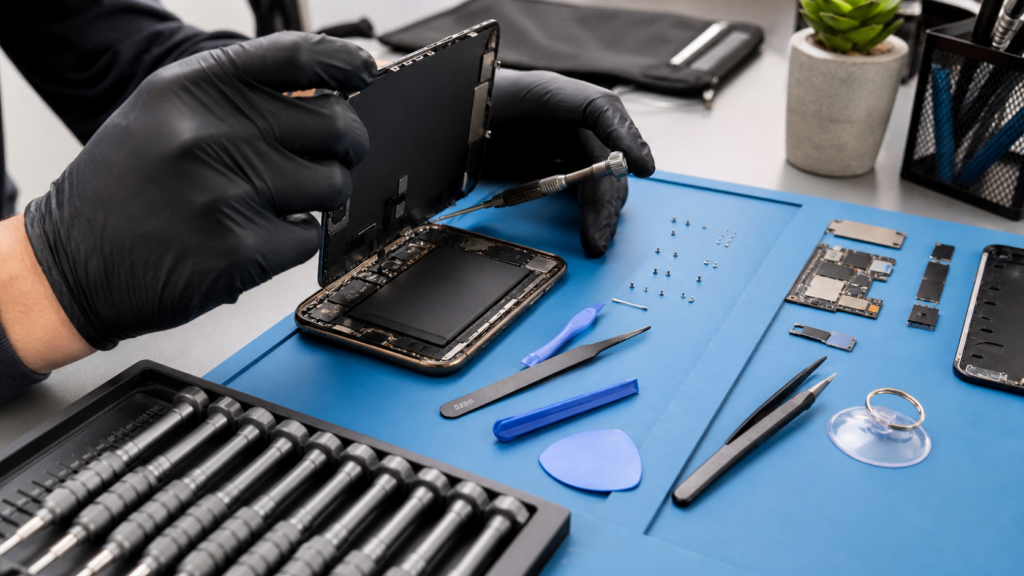
A mobile phone repair kit is an essential toolset for anyone who wants to open, inspect, maintain, or repair smartphones with more control and less risk of damaging delicate parts. Modern phones are compact, tightly assembled, and filled with small screws, fragile cables, adhesive strips, glass panels, sensors, batteries, and precision components. Because of this, using ordinary household tools can easily scratch the frame, strip screws, break clips, puncture a battery, or damage a screen connector.
A proper repair kit gives users the right combination of precision screwdrivers, pry tools, suction cups, opening picks, spudgers, tweezers, and small handling tools. These items are designed for electronics work, where accuracy matters more than force. Whether the repair involves screen replacement, battery removal, back cover opening, camera replacement, charging port work, speaker cleaning, or internal inspection, the right toolkit makes the process safer and more organized.
However, a mobile phone repair kit is not only for professional technicians. It can also help careful DIY users, hobbyists, students, refurbishers, and small electronics repair shops. The key is understanding what each tool does, how to use it safely, and when a repair should be left to a trained professional.
What Is a Mobile Phone Repair Kit?
A mobile phone repair kit is a set of specialized tools designed to open and repair smartphones and other small electronic devices. Unlike general household toolkits, these kits include precision tools made for tiny screws, tight gaps, delicate connectors, and sensitive internal parts.
A typical kit may include multiple screwdriver bits, plastic pry tools, opening picks, suction cups, spudgers, tweezers, thin blades, small pliers, SIM eject tools, and other accessories. Some kits are compact and designed for basic phone opening, while others include a larger selection of bits and tools for more detailed repair work.
The main purpose of a mobile phone repair kit is to reduce the risk of damage. Phones are not built like traditional appliances. Their internal parts are small, layered, and fragile. A metal kitchen knife, oversized screwdriver, or random blade may seem convenient, but these tools can cause permanent damage. A proper repair kit gives better control and helps protect the phone’s frame, screen, battery, and internal flex cables.
In addition, a good kit keeps the repair process organized. Smartphone screws are often different sizes and must return to their exact positions. Using the wrong screw in the wrong hole can damage the logic board or internal bracket. Therefore, precision and organization are just as important as the tools themselves.
Why a Dedicated Phone Repair Toolset Matters
Smartphones are designed with compact engineering. Manufacturers use tiny screws, adhesive seals, plastic clips, waterproofing layers, and delicate ribbon cables to keep devices thin and durable. This makes repair work challenging without the right tools.
A dedicated mobile phone repair kit matters because it helps apply controlled pressure. For example, plastic pry tools can separate covers without scratching metal frames as easily as steel tools. Suction cups can lift screens gradually. Precision screwdrivers can fit small screw heads properly, reducing the chance of stripping them.
Using the right tool also saves time. When a screwdriver bit fits correctly, screws come out smoothly. When an opening pick slides into the adhesive gap cleanly, the screen is less likely to crack. When tweezers are fine-tipped, small brackets and connectors are easier to handle.
Most importantly, proper tools support safety. Lithium-ion batteries can be dangerous if punctured, bent, overheated, or shorted. A repair kit does not remove all risk, but it helps users work more carefully and avoid using sharp or unsuitable objects around batteries.
Common Tools Included in a Mobile Phone Repair Kit
A well-rounded repair kit includes several tool categories. Each tool has a specific purpose, and knowing when to use each one improves repair quality.
Precision Screwdrivers
Precision screwdrivers are among the most important tools in any mobile phone repair kit. Phones may use Phillips, flathead, Torx, pentalobe, tri-point, or other specialty screws. A kit with multiple bits allows users to work on different phone models and small electronics.
The screwdriver handle should offer a comfortable grip and good control. Anti-slip handles are useful because phone screws are tiny and easy to strip if the tool slips. Magnetic tips can also help lift small screws, but they should be used carefully around sensitive components.
Pry Opening Tools
Pry tools are used to separate phone housings, back covers, bezels, and internal clips. Plastic pry tools are safer for many opening tasks because they are less likely to scratch or gouge the device. Thin metal pry tools may be useful for tighter gaps, but they require extra caution.
The goal is to open the phone gradually, not force it apart. Excess pressure can crack glass, bend frames, or tear internal cables.
Opening Picks
Opening picks are thin plastic tools used to cut through adhesive and keep a gap open while working around the phone edge. They are especially useful when removing screens or back glass panels.
A pick should be moved slowly and only inserted as far as needed. Many phones have cables near the edges, and inserting a tool too deeply can damage them.
Suction Cups
Suction cups help lift screens or back covers after adhesive has been softened. They provide gentle pulling force without needing to wedge a hard tool directly under the glass at first.
A suction cup works best on smooth, clean surfaces. If the glass is badly cracked, tape may be needed to create a safer gripping surface and reduce loose shards.
Spudgers
A spudger is a non-metal tool used to disconnect cables, lift connectors, move small parts, or separate components gently. Plastic or nylon spudgers are useful because they reduce the risk of short circuits compared with metal tools.
Spudgers are especially important when working near battery connectors, display cables, and logic board connections.
Tweezers
Fine-point tweezers help handle screws, brackets, adhesive strips, connectors, and small parts. ESD-safe tweezers are preferred for electronics work because static discharge can damage sensitive components.
Tweezers should be used with control. Squeezing too hard can launch small parts across the workspace or damage a fragile connector.
Thin Blades and Opening Knives
Some kits include thin blades or opening knives for cutting adhesive. These tools can be helpful, but they should be used carefully. Sharp metal tools can damage cables, batteries, and internal parts if inserted too far.
For beginners, plastic picks and controlled heat are often safer than relying heavily on blades.
Repairs a Mobile Phone Repair Kit Can Help With
A mobile phone repair kit can support many common smartphone repair tasks. The complexity depends on the phone model and the damage.
Screen Replacement
Screen replacement is one of the most common smartphone repairs. It usually requires opening the phone, removing screws and brackets, disconnecting display cables, softening adhesive, and installing the new screen.
A repair kit helps by providing opening tools, suction cups, screwdrivers, picks, and spudgers. However, screen repair can still be difficult because cables are fragile and adhesive can be strong.
Battery Replacement
Battery replacement may restore better runtime when a phone drains quickly, shuts down unexpectedly, or no longer holds charge. The repair kit can help open the device, remove shields, disconnect the battery, and lift adhesive strips.
Battery work requires caution. A swollen, punctured, or overheated battery should not be handled casually. If a battery looks damaged, professional repair is safer.
Charging Port Repair
Charging port problems may involve lint, debris, worn connectors, or internal board issues. Some repairs only need careful cleaning, while others require part replacement.
A mobile phone repair kit with tweezers, plastic tools, and precision screwdrivers can help access the port assembly. However, soldered charging ports may require advanced equipment and professional skill.
Camera, Speaker, and Button Repairs
Small modules such as cameras, speakers, vibration motors, and buttons may be replaceable depending on the phone. These repairs require careful screw removal, connector handling, and part alignment.
The correct toolkit helps prevent damage to nearby cables and brackets.
Back Cover and Frame Repairs
Phones with cracked back glass or loose covers may require opening tools, heat, picks, and adhesive handling. Back glass repair can be messy and risky because broken glass can splinter. Protective eyewear and patience are important.
Safety Steps Before Using a Mobile Phone Repair Kit
Before opening any smartphone, safety should come first. A repair kit is useful only when paired with careful preparation.
Back Up the Device
Always back up important data before repair. Even a simple repair can go wrong, and data loss is possible if the device is damaged or fails during the process.
Power Off the Phone
The phone should be fully powered off before opening. Working on an active device increases the risk of short circuits and component damage.
Discharge the Battery Partially
For many repairs, it is safer if the battery is below full charge. A battery around 25 percent or lower may reduce risk if accidental damage occurs. However, the phone should still have enough power for testing before shutdown.
Use Heat Carefully
Many phones use adhesive. Heat can soften adhesive, but too much heat can damage screens, batteries, cameras, and internal parts. Use moderate, controlled heat and avoid overheating one area.
Keep Screws Organized
Use a magnetic mat, small trays, or labelled sections to track screws. Many phone screws look similar but are different lengths. Mixing them up can cause serious internal damage.
Avoid Metal Near Batteries
Do not pry aggressively near the battery with sharp metal tools. Battery punctures can cause smoke, heat, fire, or chemical leakage.
How to Choose the Best Mobile Phone Repair Kit
Choosing the right toolkit depends on repair goals, device type, and skill level.
Check Tool Compatibility
Different phones use different screw types. A good mobile phone repair kit should include common precision bits such as Phillips, Torx, pentalobe, tri-point, and flathead options. If you plan to repair specific phone models, confirm the kit includes the required bits.
Look for Durable Materials
Screwdriver bits should be strong enough to resist bending and stripping. Pry tools should be flexible but not flimsy. Tweezers should align properly. Suction cups should grip securely. Durable tools make repairs easier and reduce frustration.
Prioritize Plastic and ESD-Safe Tools
Plastic pry tools, nylon spudgers, and ESD-safe tweezers are useful for reducing scratch and static risks. Electronics repair requires more care than general mechanical repair.
Choose a Kit With Multiple Opening Tools
One pry tool is rarely enough. Different gaps and adhesives may require picks, spudgers, suction cups, and thin openers. A kit with several opening options gives more flexibility.
Consider Storage and Organization
A repair kit with a case or organized layout is easier to use. Small tools are easy to lose, and a proper case helps keep bits, screwdrivers, and pry tools together.
Match the Kit to Your Skill Level
Beginners may need a basic kit for simple repairs and learning. More experienced users may want a larger toolkit with specialty bits, anti-static tools, magnetic mats, and advanced opening tools.
Step-by-Step Workflow for Using a Phone Repair Kit
Every phone model is different, but a careful repair workflow usually follows the same principles.
Prepare the Workspace
Use a clean, bright, stable table. Keep food, liquids, dust, and clutter away from the repair area. Good lighting helps identify screws, connectors, and adhesive points.
Review the Repair Process
Before opening the phone, understand the repair sequence. Know where screws are located, where cables connect, and which parts must be removed. Starting without a plan increases risk.
Remove External Parts
Take out the SIM tray and any case or accessories. Some phones cannot open properly if the SIM tray remains inserted.
Open the Device Slowly
Use heat if needed, then apply a suction cup and opening pick carefully. Work around the edges gradually. Do not force the cover or screen if it resists.
Disconnect the Battery
Once inside, disconnect the battery as early as the repair process allows. This helps reduce short-circuit risk while working on other components.
Remove and Replace Components
Use the correct screwdriver bit, organize screws, and disconnect cables with a spudger. Handle parts gently and avoid touching contacts unnecessarily.
Test Before Final Sealing
If possible, test the phone before applying final adhesive or closing the device completely. Check screen function, touch response, charging, cameras, speakers, buttons, and sensors.
Reassemble Carefully
Return screws to their original positions, align covers properly, and avoid pinching cables. Reassembly should feel smooth. If something does not fit, stop and inspect before forcing it.
Common Mistakes to Avoid
Even with a mobile phone repair kit, mistakes can happen. Avoiding common errors improves repair success.
Using the Wrong Screwdriver Bit
A bit that almost fits can strip a screw. Always choose the exact size and type. If the screw resists, do not force it.
Prying Too Deep
Inserting picks or blades too far can cut display cables, battery adhesive, antennas, or internal flex cables. Use shallow, controlled movements.
Mixing Screws
Wrong screw placement can damage internal boards. Keep screws organized throughout the repair.
Forgetting the Battery Connector
Working while the battery is connected increases electrical risk. Disconnect it when possible before handling internal components.
Overheating the Phone
Excess heat can damage displays, batteries, adhesive layers, and internal parts. Use controlled heat and patience.
Rushing Adhesive Removal
Screens and back covers may crack if adhesive is pulled too quickly. Slow, steady separation is safer.
DIY Repair Versus Professional Repair
A mobile phone repair kit gives users the ability to perform certain repairs, but not every problem should be handled at home.
DIY repair may be suitable for careful users replacing batteries, screens, back covers, speakers, or small modules when they have the right parts and instructions. It can save money, teach useful skills, and support device maintenance.
However, professional repair may be better for water damage, motherboard issues, soldering work, swollen batteries, advanced data recovery, expensive flagship devices, and repairs where warranty or water resistance matters. Opening a phone can affect factory seals and may void warranty coverage depending on the device and region.
The best choice depends on confidence, repair difficulty, device value, and risk tolerance.
Maintaining Your Mobile Phone Repair Kit
A repair kit lasts longer when it is cared for properly.
Clean tools after use, especially pry tools and tweezers that touch adhesive. Store screwdriver bits in their case so they do not get lost. Replace worn bits because damaged tips can strip screws. Keep suction cups clean so they maintain grip. Store tools in a dry place to reduce corrosion.
If you use the kit often, inspect tools regularly. Bent tweezers, dull blades, cracked pry tools, and worn screwdriver bits should be replaced. Good tools make delicate repairs safer and more efficient.
Why a Mobile Phone Repair Kit Supports Sustainable Device Use
Repairing phones can reduce electronic waste and extend device life. Many phones are replaced because of broken screens, weak batteries, faulty ports, or minor part failures. With the right tools and knowledge, some of these problems can be repaired instead of replacing the entire device.
A mobile phone repair kit supports a more sustainable approach by making maintenance and repair more accessible. It encourages users to understand their devices, replace worn parts, and avoid unnecessary upgrades when a repair is practical.
However, responsible repair also means knowing limits. If a repair could create safety risks or permanent damage, seeking professional help is the better option.
FAQs
What is a mobile phone repair kit used for?
A mobile phone repair kit is used to open, inspect, maintain, and repair smartphones. It can help with screen replacement, battery replacement, charging port access, camera module work, speaker repair, back cover removal, and small electronics maintenance.
What tools should a good mobile phone repair kit include?
A good kit should include precision screwdrivers, multiple screwdriver bits, plastic pry tools, opening picks, suction cups, spudgers, tweezers, thin openers, and organized storage. ESD-safe tools are also helpful for electronics work.
Can beginners use a mobile phone repair kit?
Yes, beginners can use a mobile phone repair kit for simple repairs if they work slowly, follow model-specific instructions, keep screws organized, and understand the risks. Complex repairs may still require professional help.
Is it safe to replace a phone battery yourself?
Battery replacement can be safe for careful users, but it carries risk. A lithium-ion battery should not be punctured, bent, overheated, or crushed. If the battery is swollen or damaged, professional repair is strongly recommended.
Why are plastic pry tools better for phone repair?
Plastic pry tools are less likely to scratch frames, crack glass, or short electronic components compared with metal tools. Metal tools may still be useful in some repairs but should be used carefully.
Can a mobile phone repair kit fix all phone problems?
No, a repair kit provides tools, but it does not solve every issue. Software problems, motherboard faults, water damage, soldering repairs, and advanced diagnostics may require professional equipment and expertise.
How do I avoid losing tiny phone screws?
Use a magnetic mat, labelled tray, or organized compartments. Keep screws grouped by removal step and location. Returning screws to the wrong place can damage internal components.
Does opening a phone affect water resistance?
Yes, opening a phone can affect water resistance because factory adhesive and seals may be disturbed. Replacement adhesive can help, but it may not fully restore original water resistance.
Conclusion
A mobile phone repair kit is a practical investment for anyone interested in smartphone maintenance, DIY repair, electronics work, or small device troubleshooting. With precision screwdrivers, pry tools, suction cups, spudgers, tweezers, and organized accessories, the repair process becomes safer, cleaner, and more controlled than using improvised household tools.
Still, successful phone repair depends on patience, preparation, and respect for delicate components. Users should back up data, power off the device, organize screws carefully, avoid battery damage, and follow a clear repair process. While many screen, battery, speaker, and back cover repairs can be handled with the right tools, complex issues may still require professional service. By choosing a quality repair kit and using it responsibly, users can extend device life, reduce waste, and approach smartphone repairs with greater confidence.