
Busy retail shops, cafes, bakeries, pharmacies, and restaurants lose customers rapidly when cluttered checkout counters tangle loose cables, freeze mid-rush, or force cashiers to re-key...
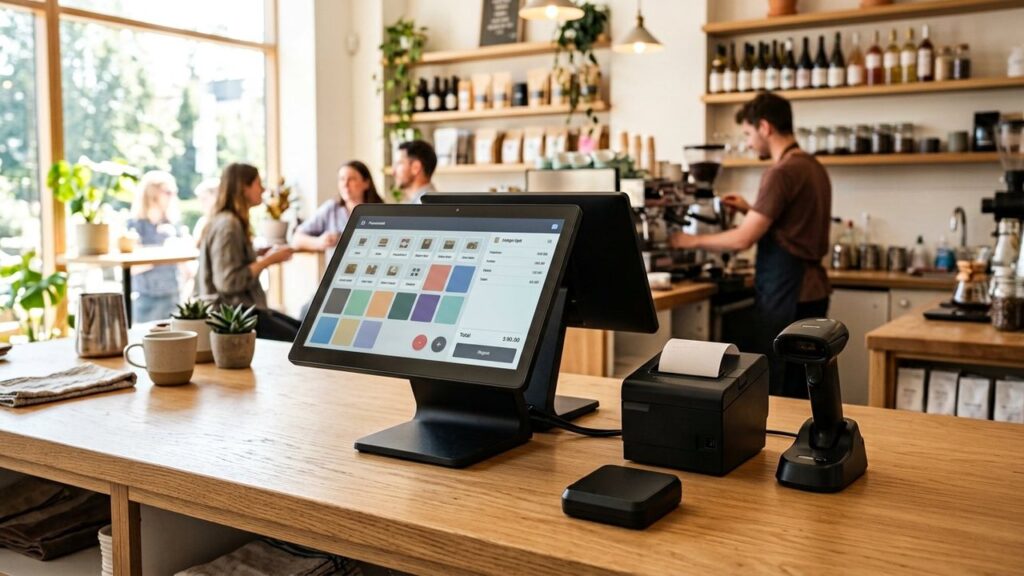
Busy retail shops, cafes, bakeries, pharmacies, and restaurants lose customers rapidly when cluttered checkout counters tangle loose cables, freeze mid-rush, or force cashiers to re-key inventory counts into separate spreadsheets after closing. Upgrading to a modern all-in-one POS system consolidates a high-performance processor, crisp touchscreen display, customer-facing screen option, magnetic card reader, and plug-and-play peripheral support into one clean, space-saving terminal built for non-stop daily transactions.
Hardware lines such as MUNBYN’s All-in-One Touch POS systems (including the aluminum-alloy IZP009, compact ABS IZP052, and IZP053 models featuring 15-inch touchscreens, Windows or optional Linux operating systems, Intel Core i3/i5 or J1900/3455/3855 processors, optional dual screens, and seamless barcode scanner, thermal printer, and cash drawer integration) show how an all-in-one POS system speeds checkout queues while syncing smoothly with third-party inventory, CRM, and accounting tools.
Choosing the right checkout hardware affects shift efficiency, employee training speed, and total operating costs for five years or longer. Understanding what distinguishes a commercial-grade all-in-one POS system from consumer tablets, comparing aluminum versus ABS housings and single versus dual screens, checking software and peripheral compatibility cleanly, and planning security and offline resilience equips store owners to invest with total clarity.
What Is an All-in-One POS System and Why Modern Stores Switch
An all-in-one POS system integrates the computer motherboard, solid-state storage, capacitive touchscreen display, mounting stand, I/O peripheral hub, and optional card reader or secondary customer display inside a single unified counter unit. Unlike piecing together a generic desktop tower beneath the desk, a separate monitor, dangling USB hubs, and mismatched receipt printers, an all-in-one POS system clears counter clutter immediately, resists coffee spills and retail dust far better, and gets new hires ringing up orders accurately within fifteen minutes.
Equally valuable is open software versatility. Commercial Windows and Linux terminals such as MUNBYN’s all-in-one POS system range do not trap merchants inside one proprietary merchant-processing fee contract forever. Store owners run their preferred retail, hospitality, salon, or grocery POS software natively while extending functionality cleanly into real-time stock tracking, customer loyalty CRM programs, multi-location reporting, and QuickBooks or Xero accounting sync.
Seven Hardware Features That Define a Reliable All-in-One POS System
Inspecting seven practical engineering specs ensures the all-in-one POS system you install today still runs smoothly through holiday traffic rushes years from now.
- Responsive 15-Inch Capacitive Touchscreen delivering wide viewing angles, effortless finger-tap accuracy, and zero-lag order entry even during peak lunch or weekend shopping surges.
- Commercial-Grade Processor and Fast SSD Storage (such as Intel Core i3-6100U, i5-6360U, or energy-efficient Celeron J1900/3455/3855 options) sized cleanly to your store’s catalog size, analytics workload, and concurrent peripheral load.
- Flexible Operating System Choice across Windows 10/11 or Linux inside your all-in-one POS system so legacy retail ERPs, cloud web POS portals, and local thermal printer drivers run smoothly with zero lock-in.
- Optional Dual-Screen Customer Display showing live itemized ring-ups, discounts, QR loyalty sign-ups, and total due directly to shoppers, reducing billing mistakes and boosting upsell transparency at checkout.
- Durable Commercial Chassis Material choosing heavy-duty aluminum alloy housing (such as the MUNBYN IZP009) for superior heat dissipation in warm restaurant kitchens or sleek, budget-friendly ABS housing (such as IZP052) for clean boutique counters.
- Rich Built-In Peripheral Connectivity (multiple USB ports, RJ11 cash drawer port, Ethernet LAN, Wi-Fi, Bluetooth, and optional integrated MSR card reader) connecting barcode scanners, 80mm thermal receipt printers, kitchen printers, and scales neatly without extra dongles.
- Built-In Security Foundations supporting encrypted transaction workflows, role-based cashier PIN authentication, and locked-down kiosk OS permissions to protect daily sales logs and customer data.
Why Purpose-Built Counter Terminals Outlast Consumer Tablets
Consumer iPads mounted on cheap plastic stands look sleek during week one, yet swollen batteries from 24/7 charging, fragile charging cables, limited USB peripheral ports, and overheating beside espresso machines quickly disrupt busy shifts. A commercial all-in-one POS system runs on dedicated AC power with fanless or metal-chassis thermal management, sturdy weighted stands, and direct wired Ethernet reliability designed explicitly for 12-to-16-hour daily retail uptime.
Comparing Popular All-in-One POS System Configurations by Store Type
Matching chassis durability, processor headroom, and screen layout to your exact retail or hospitality workflow prevents overspending on unneeded specs or buying underpowered hardware that lags during busy shifts.
| Configuration Profile | Recommended Hardware Spec | Essential Peripherals | Best Business Fit |
|---|---|---|---|
| Heavy-Duty Dual-Screen (e.g., IZP009 Aluminum) | 15-inch dual touchscreen, Intel i3/i5, Windows/Linux, aluminum alloy | 80mm thermal printer, kitchen printer, cash drawer, EMV reader | Busy cafes, quick-service restaurants, high-volume supermarkets |
| Compact Boutique POS (e.g., IZP052 ABS) | 15-inch single or dual screen, J1900/i3, Windows/Linux, ABS body | 2D barcode scanner, receipt printer, compact cash drawer, MSR | Clothing boutiques, salons, gift shops, specialty bakeries |
| Multi-Lane Retail Workstation (e.g., IZP053) | 15-inch touchscreen, Intel i5, high-speed LAN, optional MSR + dual screen | Omnidirectional desktop scanner, thermal label + receipt printer | Pharmacies, hardware stores, multi-SKU convenience chains |
Comparing All-in-One POS System vs Consumer Tablet Stands vs Legacy Cash Registers
Reviewing total three-year ownership value across checkout setups clarifies why growing merchants standardize on a commercial all-in-one POS system (and owners can calculate margin lift cleanly using a profit margin calculator).
| Checkout System | Durability & Port I/O | Inventory & CRM Sync | Long-Term Cost Efficiency |
|---|---|---|---|
| All-in-One POS System | High (5+ year life, full native USB/LAN/RJ11 ports) | Full real-time inventory, CRM, ERP, accounting sync | High (no vendor lock-in, low failure replacement rate) |
| Consumer Tablet + Stand | Moderate (battery wear, Bluetooth dropouts, few ports) | Good within closed cloud app ecosystems | Moderate (frequent battery swaps + locked card rates) |
| Legacy Electronic Register | High mechanical toughness, zero modern ports | None (manual paper Z-reports and hand counts) | Low (high cashier errors, slow audits, zero analytics) |
Step-by-Step Setup Checklist for Deploying Your All-in-One POS System
Installing a new checkout terminal does not have to shut your store down for a weekend. Following six practical rollout steps gets your all-in-one POS system scanning barcodes, printing receipts, and reconciling cash drawers cleanly before doors open.
Six Practical Steps From Unboxing to First Live Customer Ring-Up
Standardize this clean setup checklist whether deploying one neighborhood cafe counter or twenty regional retail branches.
- Step 1 Verify Software and OS Alignment first by confirming whether your chosen retail, restaurant, or pharmacy POS platform requires Windows 10/11 or Linux, plus exact RAM/CPU recommendations for large product catalogs inside your all-in-one POS system.
- Step 2 Connect Wired Ethernet Plus Backup Wi-Fi so high-speed wired LAN handles peak payment authorizations while a secondary cellular hotspot or Wi-Fi profile keeps cloud syncing resilient if broadband flickers.
- Step 3 Plug In and Test Every Peripheral Together, verifying 2D barcode scanner keyboard wedge mapping, 80mm thermal receipt printer auto-cutter alignment, RJ11 cash drawer kick-open trigger, and optional MSR or EMV contactless terminal handshake.
- Step 4 Configure Clean SKU Catalogs, Tax Rules, and Role Permissions creating unique PIN logins for cashiers versus shift managers (restricting manual voids, high-value refunds, and price overrides to manager approval inside the all-in-one POS system).
- Step 5 Enable Offline Queue Mode and Automated Cloud Backups so sales continue uninterrupted even if internet service drops temporarily, syncing transactions straight to accounting software the instant connectivity returns.
- Step 6 Run Ten Mock Shift Transactions With Staff covering split cash/card payments, discount coupons, item returns, receipt reprints, and end-of-day Z-report cash drawer reconciliation before opening day.
Integrating Inventory, Loyalty CRM, and Accounting Without Double Entry
The biggest operational savings from an all-in-one POS system happen behind the counter after the customer walks out. Connecting your terminal directly to cloud inventory management deducts sold SKUs automatically across both physical store shelves and online Shopify or WooCommerce storefronts, triggers low-stock reorder alerts automatically, awards CRM loyalty points on repeat visits, and posts daily sales summaries cleanly into accounting journals with zero manual midnight data entry.
Protecting Payment Security and Hardware Longevity at the Counter
Point-of-sale terminals handle daily revenue and sensitive card transactions, making counter security hygiene non-negotiable on every all-in-one POS system. Isolate your POS LAN onto a dedicated VLAN separated completely from free customer guest Wi-Fi, keep Windows or Linux OS security patches updated during scheduled off-hours, disable casual web browsing and unauthorized USB thumb drives on counter terminals, and pair your all-in-one POS system with encrypted, PCI-compliant EMV/NFC card terminals so raw card numbers never reside unencrypted on store drives.
Simple physical maintenance extends hardware lifespan easily past five years: wipe capacitive touchscreens weekly with alcohol-free microfiber cloths rather than harsh glass sprays, keep cooling vents clear of receipt paper dust, verify thermal printer cutter blades monthly, and plug every all-in-one POS system and router into a small Uninterruptible Power Supply (UPS) battery backup so sudden neighborhood power flickers never corrupt open sales shifts.
Scaling Multi-Store Retail Operations With an All-in-One POS System
Single-location shops initially buy an all-in-one POS system to tidy up cluttered counters and speed weekend checkout queues, yet the biggest financial upside surfaces once owners expand to two, five, or fifteen stores. Standardizing every register on the same rugged all-in-one POS system chassis, identical Windows or Linux OS image, and cloud-synced retail software eliminates mismatched peripheral headaches and lets managers transfer staff smoothly between branches with zero retraining lag.
Five Multi-Branch Advantages of a Standardized All-in-One POS System
Growing retailers and multi-unit hospitality brands unlock measurable operational leverage when every counter runs a unified all-in-one POS system deployment.
- Real-Time Cross-Store Stock Transfers letting cashiers check neighboring branch inventory right on the 15-inch capacitive screen of their all-in-one POS system instead of losing a sale when one size sells out locally.
- Centralized Price, Tax, and Promotional Push Updates syncing seasonal discounts, holiday bundle deals, and updated regional VAT or sales tax rates straight to every store’s all-in-one POS system overnight without manual terminal visits.
- Unified Customer Loyalty and Gift Card Profiles enabling shoppers who earn reward points at a flagship downtown boutique to redeem them seamlessly at suburban pop-up counters powered by an identical all-in-one POS system.
- Simplified Spare Hardware Staging keeping one pre-imaged backup all-in-one POS system unit at headquarters so any accidentally damaged branch terminal swaps out in fifteen minutes flat.
- Granular Shift Variance and Shrinkage Visibility comparing cashier void rates, manual price overrides, refund frequency, and peak hourly sales velocity across every branch running an all-in-one POS system from one executive dashboard.
Evaluating Total Cost of Ownership Over a Five-Year POS Lifecycle
Budget-conscious merchants sometimes compare sticker prices strictly between a $350 consumer tablet stand and a commercial all-in-one POS system without calculating five-year replacement, downtime, and dongle costs. Consumer tablets swell batteries under 14-hour continuous charging, overheat beside kitchen steam or sunny shop windows, and lock merchants into restrictive payment-processor surcharges. A commercial aluminum-alloy or reinforced-ABS all-in-one POS system with open Windows or Linux compatibility lets you keep your preferred low-fee merchant processor, plug standard USB/RJ11 peripherals directly into native ports, and run reliably for five to seven years of daily retail traffic.
Add in lower staff onboarding time, faster peak-hour throughput that trims walk-away queues on busy holiday weekends, and effortless accounting reconciliation across inventory and tax exports. Calculating true five-year hardware durability alongside merchant processing fees, labor savings, and zero mid-rush replacement headaches consistently proves why a rugged all-in-one POS system delivers the lowest total cost per transaction for serious stores.
Pros and Cons of Upgrading to an All-in-One POS System
Evaluating both the day-to-day checkout lift and upfront planning needs of an all-in-one POS system helps business owners make smart capital purchases.
Pros of Using a Commercial All-in-One POS System
- Clears messy counter clutter by integrating a bright 15-inch touchscreen, fast processor, optional dual customer screen, and rich peripheral ports into one durable commercial unit.
- Speeds customer queues and cuts human ring-up errors through intuitive touch interfaces, fast barcode scanning, and real-time customer-facing itemized totals.
- Supports flexible Windows or Linux third-party POS, inventory, CRM, and accounting integrations without locking stores into one expensive payment processor forever.
- Built with commercial aluminum alloy or sturdy ABS enclosures engineered to withstand long daily hospitality and retail shifts reliably.
Cons and Practical Considerations to Plan For
- Higher upfront hardware investment than repurposing an old personal tablet, though commercial longevity and lower processing lock-in usually yield lower three-year total cost.
- Requires verifying exact peripheral driver compatibility (receipt printers, scales, EMV card readers) with your chosen POS software prior to multi-store rollout.
- Fixed counter terminals excel at high-volume checkout stations, so full-service restaurants wanting tableside ordering may pair an all-in-one POS system at the main bar with handheld mobile companion units.
FAQ’s
What is an all-in-one POS system?
An all-in-one POS system is a commercial touchscreen checkout terminal that integrates the computer processor, storage, display, mounting stand, optional customer screen, and peripheral connections into one streamlined counter unit.
Which operating systems run on a modern all-in-one POS system?
Commercial hardware such as MUNBYN’s all-in-one POS system models (IZP009, IZP052, IZP053) support Windows 7/10 and optional Linux, letting merchants install almost any third-party retail, restaurant, or accounting POS software freely.
What peripherals connect to an all-in-one POS system?
An all-in-one POS system connects cleanly to 1D/2D barcode scanners, 80mm thermal receipt printers, kitchen order printers, RJ11 cash drawers, optional integrated MSR card readers, EMV/NFC payment pads, and weighing scales.
Should my store choose a single-screen or dual-screen all-in-one POS system?
A dual-screen all-in-one POS system adds high value for cafes, grocery stores, and busy retail counters by showing live itemized totals, discounts, and QR loyalty offers directly to shoppers while building checkout trust.
What is the difference between aluminum alloy and ABS housing on an all-in-one POS system?
Aluminum alloy housings (like the IZP009) deliver superior passive heat dissipation and heavy-duty durability for busy kitchens and high-volume counters, whereas ABS enclosures (like the IZP052) provide lightweight, cost-effective elegance for standard retail shops.
Can an all-in-one POS system keep selling if store Wi-Fi goes down?
Yes, when paired with POS software offering offline mode and wired Ethernet plus battery UPS protection, an all-in-one POS system queues transactions safely locally and syncs automatically once internet returns.
Conclusion
Modernizing your checkout counter with a commercial all-in-one POS system removes cable clutter, eliminates sluggish manual inventory reconciliations, and delivers fast, accurate customer service during your busiest trading hours. Flexible touchscreen terminals such as MUNBYN’s aluminum IZP009, compact IZP052, and IZP053 combine 15-inch displays, Windows or Linux freedom, optional dual customer screens, and seamless peripheral integration so growing stores own their checkout workflow without hardware bottlenecks.
Match processor headroom and enclosure durability to your daily transaction volume, lock down isolated POS network security and role-based manager permissions, and connect your all-in-one POS system straight into real-time inventory and accounting tools for cleaner margins every single shift.