
Finance teams processing high volumes of supplier invoices know the operational weight that comes with manual data entry. Errors accumulate, approval cycles stretch, and reconciliation...
Finance teams processing high volumes of supplier invoices know the operational weight that comes with manual data entry. Errors accumulate, approval cycles stretch, and reconciliation becomes a recurring bottleneck. The challenge is not simply a matter of speed — it is one of consistency and accuracy at scale. When a team is handling dozens or hundreds of invoices each week, the margin for human error compounds quickly, and the downstream effects on payment timing, vendor relationships, and audit readiness are real and measurable.
Over the past several years, optical character recognition applied specifically to invoice processing has moved from a niche technical feature to a standard expectation in accounts payable operations. Despite how widely it is discussed, the actual mechanics of the technology remain unclear to many finance professionals who use it or are evaluating it. This breakdown explains what the technology does, how it works in practice, and what finance teams should understand before integrating it into their workflows.
What Invoice OCR Actually Does at a Technical Level
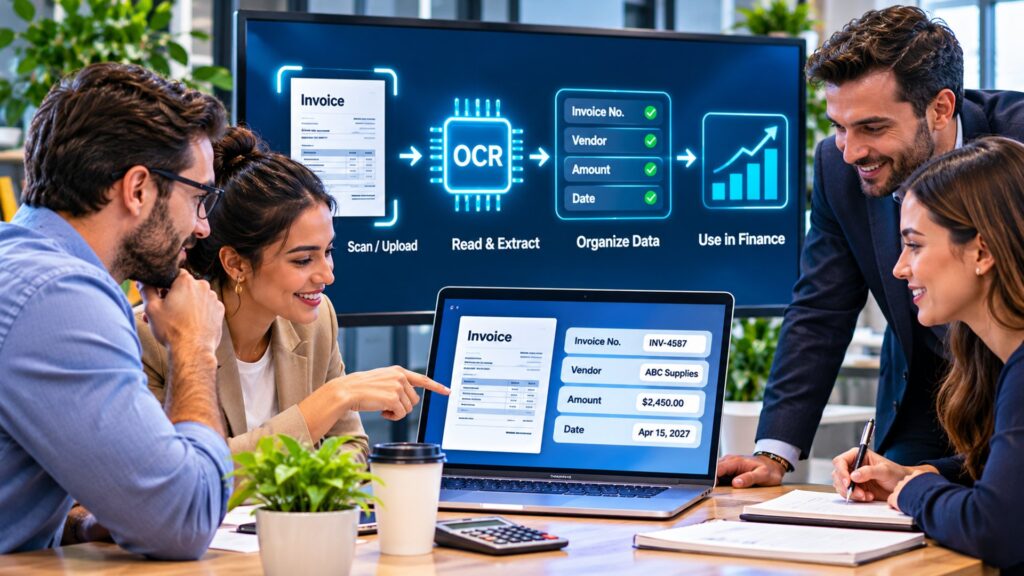
At its core, invoice ocr is the process of converting printed or digital invoice content — text, numbers, line items, and layout structures — into machine-readable data that a system can store, sort, and act upon. The term “optical character recognition” describes the underlying method: software analyzes the visual patterns in a document image and translates them into structured text. When applied to invoices specifically, this means the system is not just reading characters in isolation but interpreting fields like vendor name, invoice number, line item descriptions, tax amounts, and payment terms in relation to their position and context within the document.
What makes invoice-specific OCR distinct from general document scanning is the layer of field recognition built on top of raw text extraction. A general OCR engine reads what it sees. An invoice OCR system is trained to understand what different pieces of data mean in context — that a string of numbers near the top right of a document is likely an invoice number, that a date near the bottom is probably a due date, and that a table with quantities and unit prices represents line item detail. This contextual interpretation is what separates useful structured output from raw, unorganized character strings.
For a broader understanding of how optical character recognition works at a foundational level, the Wikipedia entry on optical character recognition provides a solid technical reference on the history and mechanics of the method.
The Role of Document Layout Analysis
Before any text is extracted, most invoice OCR systems perform a layout analysis pass on the document. This step identifies regions of the page — headers, tables, footers, logo blocks — and assigns them structural roles. The system is essentially building a map of the document before it starts reading it.
This matters because invoices are not standardized. Every supplier may use a different template, font, alignment style, or table structure. A system that relies solely on fixed coordinates to find data will fail the moment a new vendor sends a document formatted differently. Layout analysis allows the system to adapt to varied formats by recognizing structural patterns rather than fixed positions, which is what makes modern invoice OCR solutions viable across diverse supplier bases.
How Machine Learning Improves Accuracy Over Time
Modern invoice OCR platforms incorporate machine learning models that improve recognition accuracy through exposure to data. When a system processes thousands of invoices from a wide range of vendors, it builds a richer understanding of how different fields tend to appear in different contexts. It learns that a particular vendor always places their total in a specific area, or that certain document structures consistently carry purchase order numbers in a particular format.
Human corrections feed this loop. When an accounts payable clerk reviews an extracted document and corrects a field, that correction becomes a training signal. Over time, the system makes fewer errors on similar document types. This is why early performance during system implementation tends to be lower than performance after several months of use — the model is still calibrating to the organization’s specific invoice population.
The Processing Pipeline: From Received Document to Structured Data
Understanding the pipeline from document receipt to usable data helps finance teams set realistic expectations and identify where problems are likely to arise. Invoice OCR does not work as a single step — it is a sequence of operations, each of which carries its own accuracy dependencies.
The process typically begins with document ingestion, which may come from an email attachment, a scanned physical document, a supplier portal upload, or an EDI feed. The quality of the input document has a direct effect on what happens next. A cleanly scanned document with consistent contrast and no skew will produce better OCR results than a low-resolution phone photograph of a crumpled paper invoice. This is a physical constraint of the technology and one that teams often underestimate when projecting automation rates.
Pre-Processing and Image Normalization
Before character recognition begins, the document typically goes through a pre-processing stage designed to improve image quality and reduce noise. This may include correcting rotation or skew, adjusting contrast, removing background artifacts, and separating multi-page documents into individual sections. These steps are largely automated and invisible to end users, but they have a meaningful impact on extraction accuracy, particularly for documents that arrive through inconsistent channels like email or mobile capture.
Organizations that receive a significant portion of invoices as physical paper and rely on flatbed or multi-feed scanners should pay close attention to scanner configuration. The quality of the hardware and the scanning resolution directly affects what the OCR engine has to work with. Even sophisticated models struggle when the underlying image is too degraded to interpret reliably.
Field Extraction and Confidence Scoring
Once the document has been processed and analyzed, the OCR engine extracts field-level data and assigns a confidence score to each extracted value. This score reflects the system’s certainty that it has correctly identified and read a given piece of information. High-confidence fields are typically passed through automatically. Low-confidence fields are flagged for human review.
This confidence-scoring mechanism is central to how invoice OCR balances speed with accuracy in real operations. A system without confidence thresholds would either pass errors into the data unchecked or require manual review of every document. The threshold-based approach allows organizations to automate the majority of invoices while ensuring that uncertain extractions receive human attention before they enter the financial record. Setting that threshold appropriately — not so high that everything is flagged, not so low that errors slip through — is an operational decision that requires tuning based on organizational risk tolerance.
Integration with Downstream Financial Systems
Extracted invoice data has limited value sitting in isolation. The purpose of invoice OCR within an accounts payable workflow is to populate downstream systems — ERP platforms, general ledgers, payment systems, and approval queues — with clean, structured data that eliminates the need for manual re-entry. The integration architecture between the OCR layer and these systems is where implementation complexity most commonly arises.
Some organizations operate with tightly integrated procurement and payment platforms where extracted data flows automatically into predefined fields. Others work with legacy systems that require intermediate mapping steps or batch imports. The OCR layer can only do its part; the integration design determines whether that data lands accurately in the right fields within the right systems.
Three-Way Matching and Exception Handling
Many accounts payable operations use three-way matching to verify that an invoice aligns with the original purchase order and the goods receipt record before approving payment. Invoice OCR supports this process by extracting the relevant fields — PO numbers, quantities, unit prices, totals — in a structured format that can be compared programmatically against procurement records.
When a match fails, the system flags an exception. The nature of that exception — a quantity discrepancy, a price variance, a missing PO reference — determines how it should be routed for resolution. Organizations that implement exception workflows effectively can process matched invoices with minimal human involvement while ensuring discrepancies receive appropriate attention. The practical benefit is not simply time savings but a more auditable, consistent process with a clear record of how every invoice was handled.
Common Limitations Finance Teams Should Anticipate
Invoice OCR performs well under certain conditions and poorly under others. Understanding those boundaries helps teams build realistic expectations and design workflows that account for the technology’s actual capabilities rather than its theoretical potential.
Documents that present consistent challenges include handwritten invoices, heavily formatted PDFs with embedded text that resists visual extraction, documents with non-standard table structures, and invoices in languages or character sets outside the system’s training data. These are not necessarily insurmountable problems, but they require either additional configuration, specialized models, or defined manual handling procedures.
• Scanned documents with poor contrast or skewed alignment tend to produce lower accuracy rates, particularly for numeric fields where a single misread digit carries significant financial consequence.
• Invoices with highly variable layouts from infrequent vendors may require manual field mapping or supervised extraction until the system has seen enough examples to generalize reliably.
• Multi-currency and multi-language invoices introduce additional complexity that not all platforms handle equally well, particularly around symbol recognition and date format interpretation.
• Invoices with complex line item structures — bundled services, variable pricing tiers, or non-standard discount logic — may extract correctly at the header level but require human review for line-level accuracy.
Closing Thoughts for Finance Teams Evaluating This Technology
Invoice OCR is not a universal solution, and treating it as one tends to produce disappointment during implementation. It is, however, a well-established and genuinely useful tool when applied with clear expectations and appropriate process design. The teams that see the most reliable results are those that enter implementation with an honest assessment of their document population, a realistic automation rate target, and a willingness to invest time in the exception-handling workflow design that determines how the remaining volume gets resolved.
The technology reduces manual keying, accelerates approval cycles, and creates a more consistent audit trail. It does not eliminate judgment, vendor communication, or the need for people who understand what the numbers mean. What it does is free those people to spend less time transcribing documents and more time working with the data those documents contain.
Finance teams that approach invoice OCR as infrastructure — something that runs reliably in the background and feeds clean data into their systems — tend to build more sustainable workflows than those that treat it as a one-time efficiency project. Getting the foundation right, understanding its limitations, and designing around them is what determines whether the technology delivers its stated value over time.