
Customers do not always understand a product from photographs and written descriptions alone. Effective product demo video production turns features into a visual experience by showing what...
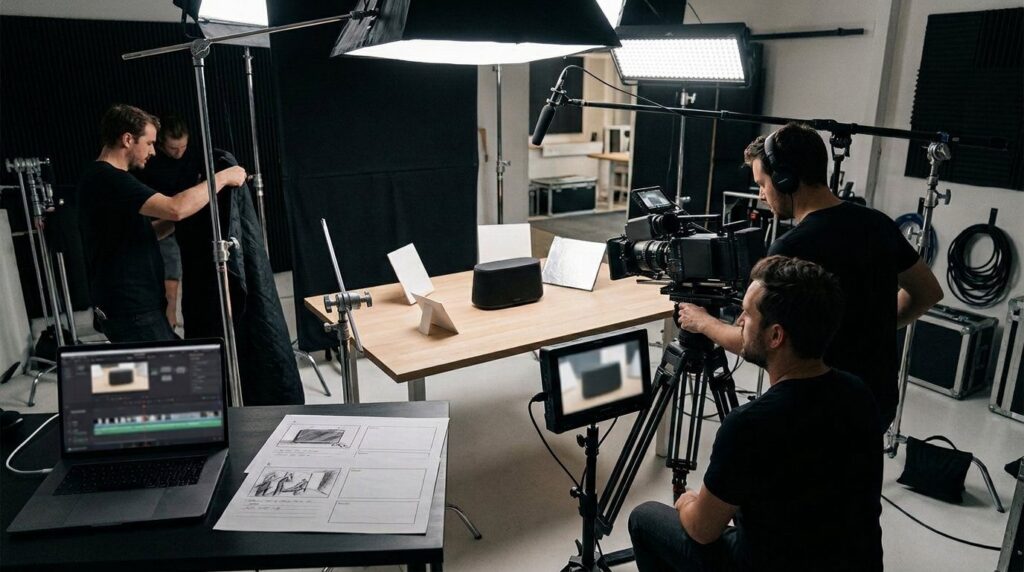
Customers do not always understand a product from photographs and written descriptions alone. Effective product demo video production turns features into a visual experience by showing what a product does, how it works, who it is designed for, and how someone can use it. Demo videos can support websites, ecommerce pages, sales presentations, product launches, onboarding, trade shows, social campaigns, and software marketing, but their effectiveness depends on much more than camera quality. A strong production begins with audience research and a clear objective before moving through scripting, storyboarding, filming or screen capture, editing, accessibility, distribution, and performance measurement.
Product demonstrations also differ from conventional advertisements. An advertisement may primarily create awareness or emotional interest, while a demonstration needs to communicate functionality clearly enough for viewers to understand the product.
The best videos can do both. They present the product attractively while maintaining enough clarity, accuracy, and context to support an informed decision.
What Is Product Demo Video Production?
Product demo video production is the process of planning and creating video content that demonstrates a physical or digital product’s operation, features, workflow, or practical applications.
The format varies according to the product.
A physical demonstration may use studio cinematography, close ups, presenters, lifestyle scenes, graphics, and voiceover. A software product may rely primarily on screen recordings, motion graphics, interface animation, and narration.
Some productions combine both approaches.
The process can include strategy, preproduction, script development, storyboarding, filming, animation, editing, sound design, color work, captions, graphics, and final exports for different distribution channels.
Why Product Demo Video Production Matters
Many products are easier to understand in motion.
A still image can display a control but cannot show what happens when someone uses it. A screenshot can show software navigation but may not explain the sequence necessary to complete a task.
Video can connect actions with outcomes.
That makes product demonstrations particularly useful for unfamiliar products, technical tools, software, equipment, or products whose value becomes clearer during real use.
Video should nevertheless complement rather than replace accurate written product information, specifications, instructions, and safety documentation where those materials are necessary.
Product Demo Video Production Versus Explainer Videos
Demo and explainer videos often overlap, but they have different emphases.
A product demo focuses substantially on the product itself and demonstrates its operation or workflow. An explainer may spend more time defining a problem, concept, service, or process before introducing the solution.
Tutorial videos go further into instruction.
A tutorial may explain each step necessary to accomplish a task, while a concise product demo might show only the primary workflow.
Defining the required format before production prevents a short marketing asset from turning into an overloaded training video.
9 Product Demo Video Production Tips for Stronger Results
A successful demonstration usually depends on decisions made before filming. These nine principles provide a practical framework.
1. Start Product Demo Video Production With One Clear Objective
Decide what the video needs viewers to understand or do.
The objective might be to introduce a newly launched product, demonstrate one feature, support a sales conversation, reduce uncertainty on a product page, or encourage qualified viewers to request a trial.
Avoid trying to accomplish every objective in one video.
A demonstration covering twenty unrelated features can become difficult to follow.
When products are complex, a short overview plus a series of focused feature videos may serve viewers better than one extremely long production.
2. Define the Product Demo Video Production Audience
A technical buyer and a first time consumer need different information.
Identify what viewers already know, which problems they are trying to solve, what objections they may have, and which product capabilities matter most to them.
Language should reflect that knowledge level.
Internal terminology can confuse prospective customers who have never used the product.
Likewise, oversimplifying a highly technical business product may fail to answer the questions expert decision makers actually have.
3. Build Product Demo Video Production Around Benefits and Evidence
Features explain what a product has. Benefits explain why those features matter in the intended context.
A useful demo connects the two.
For example, rather than only showing that software contains a particular workflow, demonstrate what task the workflow allows the user to complete.
Avoid turning benefits into unsupported guarantees.
Statements about productivity gains, financial savings, safety, performance, environmental impact, or health outcomes should have evidence appropriate to the claim.
4. Write a Focused Product Demo Video Production Script
A script gives the production structure before expensive filming or animation begins.
Begin with relevant context, establish what the product is, demonstrate the key workflow, reinforce meaningful differentiators, and finish with an appropriate next step.
Write for spoken language rather than copying website prose.
Read the script aloud.
Sentences that look polished on a page can sound unnatural when narrated.
The visuals should carry part of the communication, so narration does not need to describe every obvious action on screen. Before committing to a full shoot, some teams turn a text into a video draft first to hear how the narration flows against real visuals.
5. Storyboard Product Demo Video Production Before Filming
A storyboard maps script sections to visuals.
It can identify product angles, interface screens, close ups, graphics, presenter moments, transitions, and text that may appear on screen.
This allows production teams to identify missing shots before arriving on set.
Detailed artwork is not required.
Simple frames accompanied by shot descriptions can be enough to communicate the plan.
For complex animation, more developed style frames and animatics may be useful.
6. Prioritize Clear Product Demo Video Production Visuals
The viewer should always know what to look at.
Lighting, framing, focus, backgrounds, graphics, and editing should direct attention toward the feature being demonstrated.
Avoid visual clutter.
For physical products, clean the item before filming and prepare duplicate units if practical. Fingerprints, dust, scratches, labels, and packaging inconsistencies can become highly visible in close up footage.
For software, remove confidential or personal information from the demonstration environment.
7. Make Product Demo Video Production Audio Professional
Poor audio can make polished images feel unprofessional.
Voiceovers should be intelligible, appropriately paced, and recorded with minimal distracting noise or echo.
Presenters need microphones suitable for the shooting environment.
Music should support rather than compete with speech.
Ensure music, sound effects, fonts, stock assets, and footage are licensed for the intended commercial use.
Copyright problems can prevent distribution long after editing is complete.
8. Include Accessibility in Product Demo Video Production
Captions benefit viewers who are deaf or hard of hearing and people watching video without sound.
Accurate captions are preferable to unreviewed automatic transcription.
On screen text should remain readable long enough to understand.
Color contrast, font size, flashing content, and information conveyed only through color also deserve attention.
Where necessary, audio description or descriptive narration can communicate important visual information that is otherwise unavailable to blind or low vision users.
9. Measure Product Demo Video Production Performance
Publishing should not be the final stage.
Measure performance according to the video’s objective.
Relevant metrics can include watch time, completion, engagement, product page conversion, trial requests, qualified leads, or sales influenced by the content where attribution is appropriately configured.
Do not focus solely on view count.
A specialized B2B demonstration watched by a small number of highly relevant buyers may create more business value than a broadly viewed video reaching people with no purchase intent.
Product Demo Video Production Preproduction Planning
Preproduction converts marketing goals into a practical production plan.
This stage can save significant time because changes to a storyboard are usually easier than reshooting finished scenes.
Create a brief that stakeholders approve before major production expenditure begins.
Product Demo Video Production Creative Brief
A useful creative brief can define:
• Target audience
• Primary objective
• Product being demonstrated
• Key features and benefits
• Evidence supporting important claims
• Desired video length
• Tone and visual style
• Distribution channels
• Required aspect ratios
• Call to action
• Budget parameters
• Production schedule
• Approval stakeholders
The brief should distinguish mandatory information from optional ideas.
This helps keep revisions focused.
Product Demo Video Production Approval Process
Decide who can approve factual claims, creative direction, product accuracy, brand use, and final delivery.
Too many independent approvers can lead to contradictory feedback.
Consolidate stakeholder comments whenever possible.
For regulated products, legal or compliance review may be required before release.
Build that review into the schedule rather than presenting the finished video for compliance approval hours before launch.
Product Demo Video Production Scriptwriting
A demonstration script should respect viewers’ time.
Start with the problem or use case when context is necessary, but introduce the actual product promptly.
Do not make viewers sit through an extended company history before seeing what they searched for.
Product Demo Video Production Opening
The opening should quickly establish relevance.
A software video might show the task the viewer wants to complete. A physical product demonstration might begin with the product performing its key function.
Avoid unsupported superlatives such as “revolutionary,” “perfect,” or “the world’s best” unless they can be appropriately substantiated.
Specific information is generally more useful.
Product Demo Video Production Call to Action
The call to action should match the viewer’s position in the buying journey.
A low cost consumer product might direct users toward a product page. A complex B2B system may invite viewers to request a personalized demonstration.
Tutorial oriented content may simply guide users toward the next lesson.
One clear action usually creates less confusion than presenting five unrelated options.
Product Demo Video Production Script Accuracy
Verify model names, specifications, features, interface labels, compatibility, prices if mentioned, and technical claims immediately before production.
Products can change between script approval and release.
For software, interface updates can make screen recordings obsolete quickly.
Maintain editable project files so individual sections can be replaced without recreating the entire video.
Product Demo Video Production for Physical Products
Physical product filming relies heavily on preparation.
Decide which actions need wide shots for context and which require close ups to reveal details.
Hands may be sufficient for some demonstrations, while others benefit from a presenter or real world usage scenario.
Lighting Product Demo Video Production
Product lighting should reveal relevant shape, texture, controls, and materials.
Highly reflective products can require careful light placement to manage unwanted reflections.
Dark products may need separation from the background.
Consistency matters when shooting across several days or locations.
Record lighting setups when continuity will be important.
Product Demo Video Production Camera Choices
Camera choice matters less than whether the production can capture the required images reliably.
Resolution, dynamic range, lens availability, autofocus requirements, slow motion, recording format, and workflow can all influence selection.
Macro or close focusing lenses may be useful for small details.
Use stable support when appropriate.
Unnecessary handheld movement can distract from precise demonstrations.
Product Demo Video Production Product Preparation
Have the correct production model available.
Inspect it for manufacturing imperfections or cosmetic damage that could distract viewers.
Charge batteries, install current firmware where appropriate, and prepare every accessory required for the demonstration.
If the product is still a prototype, clearly manage any differences between the filmed model and the final customer product so the video does not become misleading.
Software Product Demo Video Production
Software demonstrations require clarity more than cinematic complexity.
The interface should be visible at the size viewers will actually encounter on their devices.
Tiny interface text can become unreadable when a desktop recording is placed inside a small video frame.
Screen Recording for Product Demo Video Production
Prepare a clean demonstration account containing realistic but fictional information.
Disable personal notifications.
Close unrelated applications and remove sensitive browser history, account details, customer information, email addresses, API keys, and credentials.
Record at an appropriate resolution.
Mouse movements should be deliberate rather than constantly circling the screen.
Zoom or highlight interface areas selectively when necessary.
Product Demo Video Production for SaaS Products
Software as a service companies often need several demonstration assets rather than one video.
A concise overview can support landing pages, while focused feature videos address specific search queries and sales questions.
Onboarding tutorials can then serve existing customers.
This modular structure also makes updating content easier.
When one interface feature changes, a short module may be replaced without reshooting an entire product film.
Product Demo Video Production and Interface Animation
Motion graphics can clarify interactions that are difficult to capture directly.
However, animation should not depict capabilities that the actual software does not have.
If a sequence is conceptual rather than a literal interface recording, make the distinction clear through visual treatment or context.
Demonstrations should accurately represent the customer experience.
Animated Product Demo Video Production
Animation can explain invisible systems, internal components, data flow, complex machinery, or products that are difficult to film.
It can also support products that have not yet been physically manufactured.
Accuracy remains important.
2D Product Demo Video Production
Two dimensional animation works well for software concepts, process visualizations, icons, diagrams, and simplified explanatory sequences.
A consistent visual system should reflect the company’s brand without overwhelming the content.
Build reusable animation components where possible.
This can lower the cost of future product updates and related videos.
3D Product Demo Video Production
Three dimensional animation can show components, exploded views, internal mechanisms, and product angles that may be difficult to photograph.
Models should accurately reflect the real product when presented as a demonstration.
Engineering CAD assets can sometimes provide a starting point, but they often require optimization and visual preparation for animation.
Technical teams should review important sequences before publication.
Product Demo Video Production Costs
Pricing varies substantially according to concept, crew, equipment, filming days, locations, talent, animation, product complexity, travel, licensing, and postproduction.
A simple screen recording with professional narration can cost far less than a multi day commercial shoot involving custom sets and 3D animation.
Budget according to communication needs.
What Affects Product Demo Video Production Pricing?
Major cost drivers can include preproduction, creative development, studio rental, crew size, camera and lighting equipment, presenters, voice talent, motion graphics, editing, sound, color grading, music licensing, revisions, and multiple deliverables.
Ask production companies what their quotation includes.
A low headline price can expand considerably when essential postproduction or revision rounds are added later.
Budgeting Product Demo Video Production
Separate must have deliverables from optional enhancements.
Invest first in a clear script, accurate demonstration, understandable visuals, and good sound.
Additional cameras, elaborate locations, cinematic effects, and complex animation are useful only when they support the objective.
Build versioning requirements into the original budget if vertical, square, widescreen, short, and long edits will all be needed.
Product Demo Video Production for Social Media
A full product demonstration may not suit every social platform.
Shorter edits can introduce one feature and direct interested viewers toward the complete demonstration.
Vertical formats may also be necessary.
Repurposing Product Demo Video Production
Plan repurposing during filming.
Capture enough resolution and composition flexibility for alternative crops. Record clean product details that can become short standalone clips.
Avoid placing essential visual information permanently at the extreme edges of a widescreen frame if vertical edits will later be required.
One planned production can potentially generate multiple useful assets without making every piece feel identical.
Product Demo Video Production SEO and GEO
Video can support search visibility when surrounding page content explains the subject clearly.
Use an accurate page title, useful description, relevant headings, transcript or supporting copy, and appropriate structured data where applicable.
Avoid keyword stuffing.
Product Demo Video Production for AI Search
AI powered search systems benefit from clear factual content that identifies the product, use case, capabilities, limitations, and supporting evidence.
Include concise answers to common questions alongside the video.
Transcripts can also make spoken information accessible to text based systems.
Keep specifications current.
Outdated technical information can reduce both user trust and the usefulness of content surfaced through search or generative systems.
Product Demo Video Production Structured Data
VideoObject structured data can help search engines understand eligible video content when implemented according to current Google documentation.
Relevant properties can include the video name, description, thumbnail, upload date, and other supported information.
Structured data must accurately describe visible page content.
Markup should not make claims or provide metadata that users cannot reconcile with the actual video.
Product Demo Video Production Mistakes to Avoid
One common mistake is treating the video as a feature checklist.
Another is delaying the actual demonstration while spending too long introducing the company.
Poor sound, tiny screen text, unsupported claims, and excessive runtime also reduce usefulness.
Product Demo Video Production Should Avoid Misleading Claims
Demonstrations should represent ordinary product capabilities accurately.
Avoid simulated outcomes presented as real performance when no qualification is provided.
Regulated categories such as healthcare, finance, safety equipment, food, and certain environmental claims may require additional review.
Evidence should support measurable claims.
A beautiful video cannot compensate for inaccurate product information.
Product Demo Video Production Should Avoid Excessive Complexity
Creative production techniques should help viewers understand the product.
Constant transitions, rapid camera movement, elaborate graphics, or loud music can become distracting.
Ask whether each element helps demonstrate functionality.
If removing an effect makes the product easier to understand, the simpler version may be stronger.
Keep Product Demo Video Production Easy to Update
Products evolve.
Record narration separately, organize editing files carefully, preserve graphic templates, and maintain source assets.
For software, consider modular scenes.
Update friendly production can significantly extend the useful life of the project and reduce the cost of future revisions.
Choosing a Product Demo Video Production Company
A strong portfolio is important, but examine work relevant to your product category.
A production company specializing in cinematic lifestyle advertising may not necessarily be the best fit for a detailed technical software demonstration.
Ask about process as well as visuals.
Questions for a Product Demo Video Production Company
Consider asking:
• How do you learn the product before scripting?
• Who verifies technical accuracy?
• What is included in preproduction?
• How many filming days are proposed?
• Are animation and screen capture included?
• Who owns the finished and source assets?
• What music and footage licenses are included?
• How many revision rounds are provided?
• Which aspect ratios will be delivered?
• How are accessibility requirements handled?
• What happens if the product interface changes?
Important answers should appear in the production agreement.
Frequently Asked Questions
What is product demo video production?
Product demo video production creates videos that visually demonstrate how a physical or digital product works, combining strategy, scripting, filming or animation, editing and distribution.
How long should a product demo video production be?
There is no universal ideal length. A simple feature may require under a minute, while complex products need longer demonstrations or a series of focused videos.
How much does product demo video production cost?
Costs depend on crew, filming, locations, animation, talent, product complexity and postproduction. A detailed creative brief is necessary for a meaningful quotation.
Can product demo video production be used for software?
Yes. Software demos commonly combine screen recording, narration, motion graphics, interface highlights and animation to demonstrate workflows and key features.
Does product demo video production help SEO?
It can support useful search content when combined with relevant page copy, accurate metadata, transcripts, structured data and content that genuinely answers user questions.
How do I choose a product demo video production company?
Compare relevant portfolio work, product understanding, scripting, technical accuracy, production quality, licensing, accessibility, revision policies, pricing and deliverables.
Conclusion
Product demo video production works best when clarity and product accuracy guide every creative decision. A strong demonstration begins with a defined audience and objective, then uses focused scripting, carefully planned visuals, professional sound, accessible editing, and appropriate distribution to show why specific features matter. Physical products, software, and technical systems each require different production approaches, so planning should reflect how the product genuinely works. By measuring results and retaining editable production assets, businesses can turn one well planned demo into a useful resource across sales, marketing, onboarding, and search.