
Remote work, distributed IT operations, third-party support, and business continuity requirements have made secure access to workplace systems a core infrastructure concern. Choosing the right Remote...
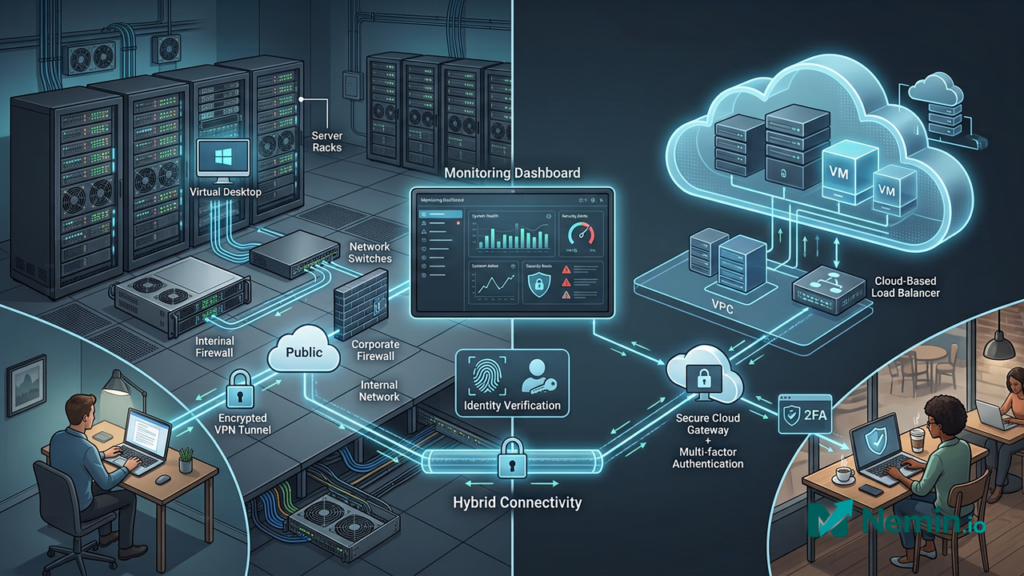
Remote work, distributed IT operations, third-party support, and business continuity requirements have made secure access to workplace systems a core infrastructure concern. Choosing the right Remote Desktop Solution Deployment model is therefore more consequential than simply deciding where a remote-access application runs. Organizations must evaluate security responsibilities, identity architecture, scalability, network performance, regulatory obligations, total cost, operational expertise, and recovery requirements. On-premises deployment can provide extensive infrastructure control, while cloud-hosted models can reduce the need to operate certain underlying components and make capacity easier to adjust. Neither approach is automatically more secure, less expensive, or better for every organization; the appropriate architecture depends on workloads, risk profile, existing infrastructure, and operational goals.
This guide compares on-premises, cloud, and hybrid remote desktop models to help IT and business decision-makers evaluate their options systematically.
What Is Remote Desktop Solution Deployment?
Remote desktop technology allows a user to interact with a computer, server, application environment, or virtual desktop from another device over a network.
A deployment model describes where the supporting infrastructure is hosted and who manages the different technology layers.
Broadly, organizations can choose among three approaches:
- On-premises deployment, where key infrastructure is operated within organization-controlled facilities or environments.
- Cloud deployment, where some or most infrastructure is hosted through cloud services.
- Hybrid deployment, which combines local and cloud resources.
The precise responsibility split differs among products, so organizations should review the architecture of each solution rather than relying only on labels such as “cloud” or “on-premises.”
On-Premises Remote Desktop Solution Deployment Explained
With an on-premises model, an organization typically hosts key remote-access infrastructure within its own environment.
Depending on the technology, this may include connection brokers, gateways, authentication integrations, application servers, virtual desktop hosts, databases, and management systems.
Advantages of On-Premises Deployment
Control is one of the primary attractions. Internal teams can make detailed decisions about network segmentation, hardware, authentication, logging, data location, patch windows, and integration with existing infrastructure.
This can be useful for organizations with specialized legacy applications or strict operational requirements.
On-premises infrastructure may also suit environments with significant existing data-center investments and experienced internal administrators.
Limitations of On-Premises Deployment
Greater control also creates greater responsibility.
Organizations typically need to manage capacity planning, hardware lifecycle, redundancy, patching, backups, monitoring, disaster recovery, physical security, and infrastructure upgrades.
Scaling can require purchasing and provisioning additional resources, which may take longer than increasing cloud capacity.
Cloud Remote Desktop Solution Deployment Explained
A cloud-based approach hosts some or all remote desktop infrastructure in a public, private, or managed cloud environment.
The exact model varies. In some cases, customers manage virtual machines in infrastructure-as-a-service environments. In others, a provider delivers a more fully managed desktop-as-a-service offering.
Benefits of Cloud Deployment
Cloud infrastructure can make capacity more flexible because compute and storage resources can often be provisioned without purchasing physical servers.
It can also support geographically distributed users when suitable cloud regions and network designs are available.
Managed services may reduce responsibility for selected infrastructure components, although customers continue to have important responsibilities involving users, identities, endpoints, configuration, data, and access policies.
Limitations of Cloud Deployment
Cloud services do not eliminate infrastructure concerns.
Organizations must consider recurring consumption costs, connectivity, provider availability, regional service options, data residency, configuration risks, and potential dependence on a particular vendor ecosystem.
Poor resource management can also produce unexpected cloud bills, particularly when virtual desktops remain active unnecessarily or high-performance configurations are widely provisioned.
1. Compare Security Responsibilities, Not Security Labels
Remote Desktop Solution Deployment and Security
The question “Is cloud or on-premises more secure?” is too broad to produce a useful answer.
Security depends heavily on implementation.
An on-premises environment can be strongly secured when appropriately configured and maintained. It can also become vulnerable when gateways remain unpatched or remote services are directly exposed to the internet.
Cloud environments benefit from provider security capabilities but can still be compromised through weak identities, excessive privileges, configuration errors, exposed resources, or stolen credentials.
Important controls may include:
- Multi-factor authentication
- Least-privilege access
- Network segmentation
- Conditional access
- Encryption
- Endpoint security
- Centralized logging
- Vulnerability management
- Session controls
- Prompt patching
Remote access should be treated as a high-value attack surface regardless of hosting model.
2. Evaluate Total Cost of Ownership
A simple comparison between server purchases and monthly cloud charges can be misleading.
On-premises costs may include hardware, facilities, electricity, cooling, software licensing, networking, redundancy, maintenance, staffing, backups, and hardware replacement.
Cloud costs can include compute, storage, networking, licensing, data transfer, security services, backups, monitoring, support, and management labor.
Remote Desktop Solution Deployment Cost Considerations
Usage patterns matter significantly.
A steady workload running continuously may have a different economic profile from an environment where demand changes dramatically by hour, day, or season.
Organizations should model costs over several years and include administration, migration, resilience, and likely growth rather than focusing only on initial expenditure.
3. Consider Scalability and Workforce Changes
Remote desktop demand rarely remains static.
Companies may hire employees, add contractors, open new locations, acquire businesses, or experience seasonal workloads.
Cloud infrastructure can be attractive when capacity needs change frequently because resources may be added or reduced programmatically.
On-premises systems can also scale, but physical capacity must generally be available or procured.
Organizations with predictable usage may prefer planned infrastructure, while highly variable workloads may benefit from greater elasticity.
4. Measure Performance From the User’s Perspective
Remote desktop performance depends on more than server specifications.
Latency, packet loss, bandwidth, display resolution, protocol efficiency, endpoint performance, application design, and the physical distance between users and workloads all influence responsiveness.
For office applications, moderate latency may be manageable. Graphics-heavy engineering, video, 3D design, or other demanding workloads may require specialized configurations.
Performance Testing for Remote Desktop Solution Deployment
Teams should test representative workloads with actual user locations and realistic network conditions.
Pilot programs can measure login duration, application responsiveness, session stability, bandwidth consumption, and user experience before organization-wide deployment.
Marketing specifications cannot substitute for workload-specific performance testing.
5. Examine Compliance and Data Residency
Organizations in healthcare, finance, government, legal services, and other regulated sectors may have specific requirements for data handling and system access.
On-premises hosting may provide greater direct control over physical infrastructure, but that does not automatically create regulatory compliance.
Cloud environments can also support regulated workloads when appropriately configured and when provider capabilities, contracts, and regional requirements align with the organization’s obligations.
The organization remains responsible for understanding which regulations apply.
Compliance assessments may need to consider data residency, encryption, retention, access logging, identity controls, subcontractors, breach procedures, and auditability.
6. Plan for Business Continuity and Disaster Recovery
Remote desktop infrastructure often becomes especially valuable during disruptions, making resilience essential.
On-premises environments may need redundant power, networking, servers, storage, backup systems, and secondary sites to withstand local failures.
Cloud services can provide multiple availability zones or regions, depending on the provider and architecture. However, simply placing a virtual machine in the cloud does not automatically make an application highly available.
Recovery objectives should be defined explicitly.
Recovery Time Objective (RTO) describes how quickly service should be restored. Recovery Point Objective (RPO) describes how much data loss may be acceptable.
Architecture and backup procedures can then be designed around those requirements.
7. Account for IT Skills and Operational Capacity
Managing Remote Desktop Solution Deployment
Technology choices should reflect the people available to operate them.
An organization with experienced virtualization, networking, storage, and security teams may be comfortable managing a sophisticated on-premises environment.
A smaller IT department may prefer managed cloud services that reduce responsibility for selected infrastructure layers.
Cloud deployments still require expertise. Identity management, policy configuration, cost optimization, network architecture, endpoint management, monitoring, and security remain important operational responsibilities.
The goal should be to select an architecture the organization can operate reliably, not merely one it can deploy.
8. Understand Vendor Lock-In and Portability
Both on-premises and cloud solutions can create dependencies.
An organization might depend on proprietary virtualization formats, management platforms, cloud APIs, licensing models, identity systems, or provider-specific storage.
Before selecting a platform, investigate how difficult it would be to move applications, user profiles, data, configuration, and identity integrations elsewhere.
Portability may not require complete vendor independence. Instead, organizations should understand the switching cost and decide whether the benefits justify that dependency.
Documented export processes and tested recovery procedures can reduce future surprises.
9. Consider a Hybrid Remote Desktop Solution Deployment
For some organizations, the choice does not need to be exclusively on-premises or cloud.
Hybrid architectures can keep specific workloads or sensitive systems on local infrastructure while using cloud resources for other user groups, temporary capacity, disaster recovery, or geographically distributed access.
A hybrid design can provide flexibility, but it also introduces additional integration challenges.
Teams may need to coordinate identity, networking, monitoring, security policy, user profiles, data access, and operational ownership across environments.
Hybrid infrastructure should therefore be adopted for a clear business or technical reason rather than simply because it appears to offer “the best of both worlds.”
On-Premises vs Cloud: Which Model Offers More Control?
On-premises infrastructure generally provides organizations with greater direct control over physical hardware and many infrastructure decisions.
Cloud platforms trade some of this low-level control for standardized services, automation, elasticity, and managed capabilities.
The important question is how much control the organization genuinely requires.
Operating every infrastructure layer internally can add complexity without creating meaningful value if business requirements can be satisfied through a managed service. Conversely, workloads with unusual networking, hardware, legacy integration, or data-governance requirements may justify greater infrastructure control.
User Experience Should Influence the Decision
Infrastructure decisions are ultimately experienced by users.
A technically secure system that takes too long to log in, drops sessions, or makes key applications difficult to use may encourage workarounds and create support costs.
Organizations should evaluate device compatibility, authentication experience, peripheral support, printing, audio and video quality, accessibility, reconnection behavior, and support processes.
User experience should be measured during pilots rather than assumed from architecture diagrams.
Remote Access and Zero-Trust Principles
Modern remote desktop architecture can benefit from zero-trust principles such as verifying identities, limiting access, assessing device posture, and continuously evaluating authorization.
This does not necessarily mean removing all network controls. Rather, access decisions should not rely exclusively on the assumption that a device or user is trustworthy because it is connected to a particular network.
Strong identity controls are particularly important because stolen credentials remain a significant risk for remote-access systems.
Administrators should also receive stronger protection than ordinary users because privileged accounts can provide broad infrastructure access.
Common Deployment Mistakes to Avoid
One common mistake is exposing remote desktop services directly to the public internet without appropriate protective architecture.
Another is treating multi-factor authentication as the entire security strategy. MFA is valuable, but organizations still need patching, endpoint controls, secure configuration, logging, access restrictions, and incident response.
Cost assumptions also create problems. Cloud infrastructure can become expensive without appropriate resource controls, while on-premises infrastructure can appear inexpensive when staffing, facilities, resilience, and replacement expenses are omitted.
Finally, organizations should avoid designing only for normal operations. Backup, recovery, account compromise, provider outages, and network failures should be considered before deployment.
Frequently Asked Questions
1. What is Remote Desktop Solution Deployment?
Remote Desktop Solution Deployment is the process of implementing infrastructure that enables users to remotely access desktops, applications, or computer systems through on-premises, cloud, or hybrid architectures.
2. Is cloud remote desktop more secure than on-premises?
Not automatically. Security depends on architecture, configuration, identity protection, patching, monitoring, endpoint controls, and operational practices in either environment.
3. Which remote desktop model is cheaper?
There is no universal winner. Cost depends on user numbers, workload patterns, licensing, existing infrastructure, staffing, cloud consumption, resilience requirements, and the evaluation period.
4. Can Remote Desktop Solution Deployment use a hybrid model?
Yes. Organizations can combine local and cloud infrastructure when workload, compliance, resilience, or scalability requirements justify the added complexity.
5. What should businesses evaluate before deploying remote desktops?
Key factors include security, identity, cost, performance, scalability, compliance, data location, disaster recovery, internal expertise, integrations, and user experience.
6. How can organizations secure remote desktop access?
Use layered controls such as MFA, least privilege, secure gateways, patching, endpoint protection, encryption, network segmentation, monitoring, and well-tested incident-response procedures.
Conclusion
Choosing between on-premises and cloud infrastructure requires a broader analysis than comparing hardware ownership with monthly subscription costs. Effective Remote Desktop Solution Deployment must account for security responsibilities, identity architecture, user experience, network performance, scalability, compliance, disaster recovery, operational skills, and long-term total cost. On-premises models can offer extensive control and support specialized environments, while cloud services can provide elasticity and reduce the need to operate certain infrastructure components. Hybrid designs can address mixed requirements but introduce additional management complexity. The strongest decision comes from defining measurable business and technical requirements first, testing realistic workloads, and then selecting the architecture that the organization can secure, support, monitor, and recover reliably over its full lifecycle.