
Many good videos begin with something simple. It might be a product idea or a social media post or even a tutorial of one minute....
Many good videos begin with something simple. It might be a product idea or a social media post or even a tutorial of one minute. The challenge is most often getting the idea to something that people can watch and engage with.
The traditional video creation process includes steps from scripting to filming and recording voiceovers to editing video footage before exporting the final video. However, AI video creation is changing this workflow. Creators now can start with a basic idea and build a video around it instead of managing the traditional process step by step.
One platform that is created for this type of workflow is Vidnoz AI. It integrates features like AI avatars, voices, and templates to streamline the video production process from the start of an idea to the end product.
What Makes Vidnoz AI Useful for Fast Video Creation?
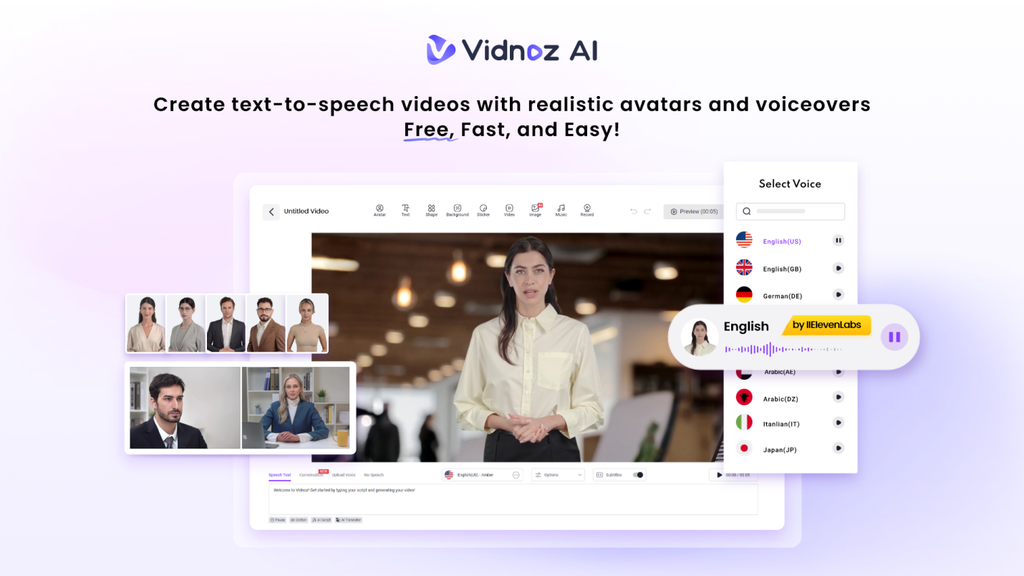
Vidnoz AI is an AI-powered video generation platform that transforms written content into video format. You can do so with resources such as digital presenters, AI voices, and templates. For creators and businesses, it means that you don’t need to go through detailed filming session to create a video. A video can be created from a written script and an AI avatar serves as the presenter using this tool.
Security is also a crucial factor to consider when it comes to employing an online AI platform for a business or creative project. Vidnoz AI is ISO/IEC 27001:2022 certified. For users who are dealing with digital information for business, this is important.
You can use the videos created with Vidnoz AI anywhere to present your content to your potential audience without any hassle.
The Features That Help Ideas Move From Draft to Video
Here are the key features of Vidnoz AI which makes it suitable for faster video creation.
2,000+ AI Voices for Instant Narration
Manual voiceover is time consuming. However, AI voiceovers can completely change the style of your videos. With over 2,000 realistic AI voices, Vidnoz AI offers a wide range of options for narration.
The selected language and speaking style for the content can be chosen to generate a voiceover. This can be helpful when creating multiple copies of a video for various groups. The AI voice also supports avatar lip movements to make the presenter feel like he is speaking with the generated narration.
2,800+ Ready to Use Templates for Quick Start
Sometimes the video production process can seem more tedious if you have to build a video project from scratch. Vidnoz AI has over 2,800 templates, including those for various content types and languages.
Templates can provide the basic visual structure for a video. Instead of designing every scene from scratch, users can select a suitable starting point and focus on the information they want to communicate.
A Daily Free Option for Testing Ideas
Vidnoz AI offers 30 credits of free use daily, letting users try out creating videos with AI without having to commit to a plan. This can come in handy when you need to test a new concept or make some quick content.
1,900+ AI Avatars for Different Video Styles
Vidnoz AI offers more than 1,900 realistic AI avatars representing different roles and industries. Users can find avatars suited to a variety of topics. You can find AI roles readily available for anything you can think of.
This gives creators an alternative to appearing on camera themselves or hiring a presenter for every video. Vidnoz AI gives users several ways to approach avatar-based video creation.
- Avatar Lite is aimed at quick video production. It is useful when the main goal is to turn an idea into a presentable video without spending too much time on setup.
- Custom Avatar Pro provides more creative control and additional customization possibilities, including flexible background options. This can be useful for creators who want their videos to follow a particular visual direction.
- Expressive avatars with natural gestures and facial movement.
- Motion Avatars can carry out full body movements that are natural looking such as gestures, body movements, and facial expressions. They can also be used for creating videos with various cartoon styles.
Alternatively, you can develop a digital twin that can be spoken in over 40 languages, and even use the user’s voice. This can be beneficial for creators that wish to create content for audiences in a number of areas.
How to Use Vidnoz AI in 4 Simple Steps?
Here is how easy it is to use Vidnoz AI for video creation.
Pick Your Template and AI Avatar
First, you need to determine the type of video you want to create, and then you can check out the templates that are available. Choose a layout that aligns with the concept and pick an AI avatar that matches the content, target audience and video mood.
Turn Your Idea Into a Voiceover
Create a brief script that clearly conveys the main message in a natural style. Pick an AI voice from the options, choose the language and speaking style and let Vidnoz AI do the narration for you and sync it with the avatar.
Give the Video Your Own Look
Include beneficial visual elements like images, logos, and visual support. Ensure that the message in each scene remains focused. Make sure that not too much information is given to the viewers otherwise they may feel overwhelmed.
Generate, Check, and Publish
When the scenes and narration are complete, create the video and preview the full video before sharing it. Ensure that the pronunciation, captions, timing, visuals and final message are correct, then export the video for the intended platform.
Why Speed Matters for Content Creators?
Being able to create a video quickly has more value than simply saving a few hours. It gives creators room to experiment.
For example, instead of spending an entire day producing one video, a marketer may be able to test several different concepts. A teacher could turn several short lessons into separate videos. A business could create multiple versions of an announcement for different audiences.
This makes video creation less dependent on a single large production project.
Final Thoughts
Turning an idea into a video has traditionally required more than creativity. It also required equipment, people, time, and technical skills. AI video platforms are changing that process by allowing creators to start with something as simple as a written script.
For creators, educators, marketers, and businesses that need to turn ideas into videos more quickly, Vidnoz AI video generator provides a practical workflow that can reduce the distance between having an idea and actually publishing it.