
Choosing the right ergonomic office chair can make a significant difference to how comfortable and supported you feel throughout the working day. Whether you work...
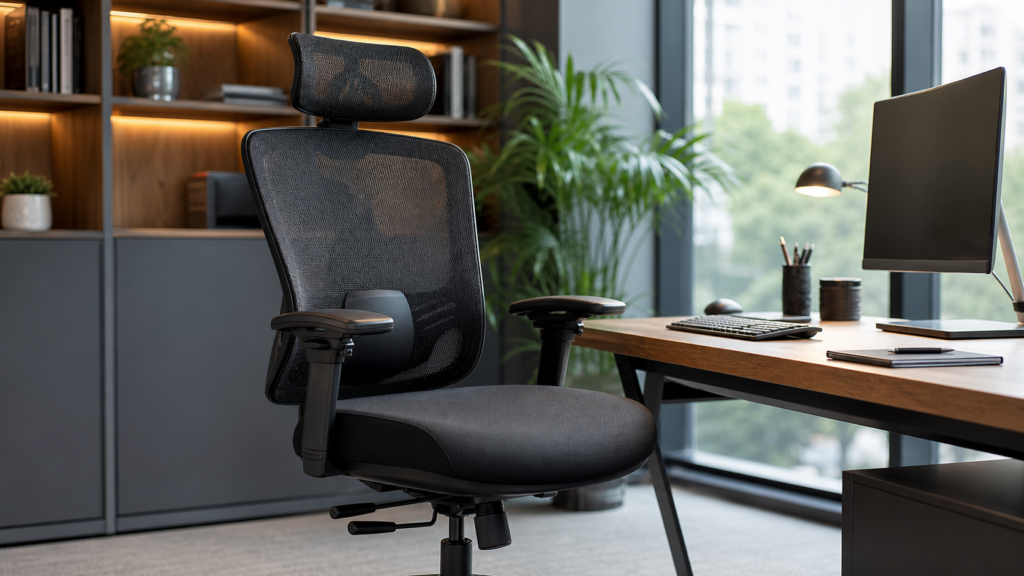
Choosing the right ergonomic office chair can make a significant difference to how comfortable and supported you feel throughout the working day. Whether you work in a traditional office, a home workspace, a control room, or another environment where long periods of sitting are common, the chair you use affects much more than appearance. It can influence posture, concentration, comfort, movement, and how easily you remain productive over several hours.
A standard office chair may be perfectly suitable for occasional use, but people who spend most of the day seated often need more support and adjustability. That is where ergonomic seating becomes important.
An ergonomic chair is designed around the user rather than expecting every person to sit in exactly the same position. Adjustable components allow the chair to accommodate different body shapes, desk heights, working habits, and seating preferences.
However, not every chair marketed as ergonomic offers the same level of support. Understanding the features that genuinely matter can help you make a better decision and avoid paying for unnecessary extras.
This guide explains what ergonomic office chairs are, how they work, which features matter most, and what to consider before choosing one.
What Is an Ergonomic Office Chair?
An ergonomic office chair is a chair designed to support comfortable and efficient sitting during work.
Unlike basic chairs with limited adjustment, ergonomic models usually provide several ways to customise the seating position. Depending on the design, these may include adjustable seat height, lumbar support, armrests, backrest angle, seat depth, headrest position, and reclining resistance.
The purpose is not to force the body into one rigid position.
Instead, ergonomic seating allows the user to create a setup that supports natural posture while still encouraging movement throughout the day.
Different people have different heights, body proportions, desk arrangements, and working habits. A chair that works well for one person may feel uncomfortable for another.
Adjustability helps solve this problem.
Why Ergonomics Matters in the Workplace
Many modern jobs involve spending several hours at a desk.
Employees may work on computers, answer calls, analyse information, attend online meetings, write documents, monitor systems, or perform administrative tasks while remaining seated for long periods.
When a chair does not provide enough support, users often adjust their bodies to compensate.
They may lean forward, raise their shoulders, sit too low, slide towards the front of the chair, or remain in awkward positions for extended periods.
Over time, uncomfortable seating can become distracting.
Ergonomic furniture aims to create a working environment where the equipment adapts more effectively to the user.
A properly adjusted chair can help the user sit comfortably while maintaining easy access to the desk, keyboard, mouse, and monitor.
Many people round out the setup by adding large cushioned desk mats that keep the keyboard and mouse stable and give the wrists a softer surface.
Key Features of an Ergonomic Office Chair
The quality of an ergonomic chair depends heavily on the features it provides.
A chair does not necessarily need every available adjustment, but certain features are particularly useful for people who sit for long periods.
Adjustable Seat Height
Seat height adjustment is one of the most important ergonomic features.
The user should normally be able to position the chair so their feet rest comfortably on the floor or on a suitable footrest.
The knees should remain in a relaxed position rather than being pushed upward or hanging without support.
The correct chair height also helps align the user’s arms with the desk surface.
If the chair is too low, the user may raise their shoulders while typing.
If it is too high, they may lean forward or place excessive pressure on the underside of the thighs.
A smooth gas-lift mechanism makes height adjustment quick and convenient.
Lumbar Support
The lower back naturally curves inward.
A supportive office chair should help maintain that shape without pushing the user into an uncomfortable posture.
Lumbar support is therefore one of the most commonly associated features of ergonomic seating.
Some chairs include fixed lumbar shaping, while more advanced models allow the user to adjust the height or depth of the support.
Adjustable lumbar systems are particularly useful in shared workplaces where several people may use the same chair.
The support should feel noticeable but not excessive.
Adjustable Backrest
A flexible backrest allows users to change their position during the day.
Some chairs allow the backrest to recline, while others include a synchronised mechanism where the seat and backrest move together.
Movement can make long periods of sitting more comfortable because users do not have to remain in exactly the same posture for several hours.
The backrest should provide consistent support whether the user is sitting upright, leaning slightly back, or changing position.
Seat Depth Adjustment
Seat depth is often overlooked when choosing an office chair.
However, it can be particularly important for users who are taller or shorter than average.
A seat that is too deep may press against the back of the knees.
A seat that is too shallow may provide inadequate thigh support.
Some ergonomic office chairs include a sliding seat mechanism that allows users to move the seat forward or backward.
This adjustment makes it easier to create a comfortable fit for different leg lengths.
Adjustable Armrests
Armrests can reduce the need to hold the arms unsupported for long periods.
However, poorly positioned armrests can also become inconvenient.
Ideally, armrests should support the forearms while allowing the shoulders to remain relaxed.
Many ergonomic chairs offer height-adjustable arms.
More advanced designs may also allow users to change armrest width, depth, or angle.
This additional flexibility can be particularly useful for computer users.
Headrest
A headrest is not essential for every office task, but some users find it useful.
Headrests are especially common on executive chairs and chairs designed for extended use.
An adjustable headrest can provide additional support when reclining or during periods when the user is not actively typing.
The best designs allow the height and angle to be adjusted so that the headrest fits naturally rather than pushing the head forward.
Ergonomic Office Chairs for Long Working Hours
Some workplaces operate beyond the traditional eight-hour working day.
Call centres, security control rooms, monitoring facilities, transport operations, emergency services, utilities, and other organisations may require seating that remains in constant use.
In these environments, standard office furniture may not always be suitable.
Chairs designed for prolonged or continuous use often feature stronger components, more durable upholstery, advanced adjustment mechanisms, and heavier-duty construction.
These models are sometimes referred to as 24-hour office chairs.
They are usually designed to tolerate significantly more frequent use than standard office seating.
For businesses with rotating shifts, investing in durable ergonomic seating can be particularly important because the chair may be used by several people throughout the day.
Ergonomic Chair vs Standard Office Chair
The main difference between ergonomic and standard office chairs is usually adjustability.
A basic chair might only offer seat height adjustment and a simple backrest.
An ergonomic chair generally provides more opportunities to customise the sitting position.
For example, a standard chair may have fixed armrests, while an ergonomic model may allow the armrests to move up and down.
Likewise, an ergonomic chair may include adjustable lumbar support, seat depth control, and multiple reclining positions.
This does not mean that every expensive chair is automatically better.
The most suitable chair is one that fits the user and the working environment.
Benefits of Choosing an Ergonomic Office Chair
There are several practical reasons why organisations and individual workers choose ergonomic seating.
Improved Comfort
Comfort is often the most noticeable benefit.
When the chair fits the user’s body properly, there is less need to constantly shift position simply because the seat feels awkward.
A supportive backrest, correctly positioned armrests, and suitable seat depth can make long working sessions more manageable.
Better Working Posture
Ergonomic chairs allow users to adjust their position according to the desk and equipment around them.
This can make it easier to maintain a comfortable working posture.
However, the chair must still be adjusted properly.
Even the most advanced ergonomic chair provides limited benefit if the user does not configure it correctly.
Greater Flexibility
People rarely sit in exactly the same position throughout the entire working day.
A good ergonomic chair allows movement.
Users may sit upright while typing, lean back during a call, or adjust the seat when switching tasks.
Flexible seating supports these natural changes.
Suitable for Different Users
Adjustability is particularly useful in shared workspaces.
When several employees use the same workstation, each person can modify the chair to suit their body size and preferences.
This is especially important in offices operating multiple shifts.
Improved Workspace Experience
Comfortable furniture contributes to the overall quality of a working environment.
Employees are more likely to appreciate a workspace that provides suitable equipment for the tasks they perform.
Ergonomic furniture can therefore form part of a broader strategy for improving workplace design.
How to Adjust an Ergonomic Office Chair Correctly
Buying an ergonomic chair is only the first step.
Correct adjustment is equally important.
Start With the Seat Height
Sit fully back in the chair.
Adjust the height until your feet are comfortably supported.
Your legs should feel relaxed without excessive pressure under the thighs.
The exact position will depend on your desk height and body proportions.
Position the Backrest
Move the backrest so it supports your back naturally.
Avoid sitting several centimetres away from the backrest.
Your lower back should normally remain supported when you are working.
Adjust the Lumbar Support
If the chair has adjustable lumbar support, position it so it sits comfortably against the lower back.
The support should follow the natural curve of the spine rather than creating excessive pressure.
Set the Armrests
Adjust the armrests so your shoulders can remain relaxed.
Your elbows should rest comfortably without needing to lift your shoulders.
If the armrests prevent you from moving close enough to the desk, adjust or lower them where possible.
Check Seat Depth
If your chair includes seat depth adjustment, ensure the seat supports most of your thighs without pressing firmly against the back of your knees.
A small amount of space between the seat edge and the knees is generally more comfortable.
Adjust Recline Resistance
Some chairs allow users to change the resistance of the reclining mechanism.
Adjust it so you can lean back comfortably without feeling that the chair is either too loose or too difficult to move.
Choosing the Right Ergonomic Chair for Your Body
There is no single ergonomic chair that is perfect for everyone.
Body size and proportions vary considerably.
A tall user may need greater seat depth and a higher backrest.
A shorter user may need a smaller seat and greater height flexibility.
When possible, check the manufacturer’s recommended user height and weight ranges.
Also consider the width of the seat and the distance between the armrests.
The chair should allow comfortable movement without feeling restrictive.
Mesh vs Fabric vs Leather-Style Office Chairs
Upholstery can influence both appearance and comfort.
Mesh Chairs
Mesh backrests are common in modern offices.
They allow airflow around the user’s back and often provide flexible support.
Mesh chairs can be particularly comfortable in warm office environments.
Fabric Chairs
Fabric upholstery is widely used because it offers a softer feel and comes in many colours and finishes.
Quality fabric can also be durable when properly maintained.
Leather and Leather-Style Chairs
Leather and leather-style materials are often associated with executive office furniture.
They provide a distinctive appearance and are generally easy to wipe clean.
However, breathability and durability can vary depending on the material.
The best choice depends on the environment, user preferences, maintenance requirements, and budget.
What to Consider When Buying an Ergonomic Office Chair
Before choosing a chair, consider how it will actually be used.
Daily Usage Time
Someone who sits for two hours per day may have very different requirements from someone working a ten-hour shift.
For extended use, prioritise durability, adjustability, cushioning, and support.
User Weight Capacity
Always check the recommended maximum user weight.
Heavy-duty chairs are designed with stronger frames, bases, gas lifts, and mechanisms.
Using a chair outside its recommended range may reduce its lifespan.
Warranty
A good warranty can provide reassurance regarding the chair’s construction and components.
Check which parts are covered and whether the warranty has specific conditions relating to usage.
Workplace Environment
A home office, corporate workspace, industrial control room, and reception area may all have different requirements.
Think about durability, appearance, cleaning, floor type, and whether the chair will be shared.
Available Space
Large executive chairs can require considerably more space than compact task chairs.
Measure the available area before purchasing.
Consider how easily the chair can move around the desk and nearby furniture.
Common Mistakes When Choosing an Office Chair
One common mistake is focusing only on appearance.
A chair can look impressive but provide limited adjustability.
Another mistake is assuming that more padding automatically means greater comfort.
Excessively soft seating may not always provide the support needed for prolonged use.
Some buyers also ignore seat dimensions.
A chair that is too large or too small can be uncomfortable even if it has advanced ergonomic features.
Finally, users sometimes forget to adjust the chair after purchasing it.
Taking a few minutes to configure the seat height, lumbar support, backrest, and armrests can make a noticeable difference.
Ergonomic Chairs for Home Offices
Remote and hybrid working have made home office furniture increasingly important.
Many people initially work from dining chairs, sofas, or temporary setups.
These arrangements may be manageable for occasional work but can become uncomfortable when used every day.
An ergonomic office chair can make a home workspace feel much more practical.
When choosing one, consider both comfort and available space.
Compact ergonomic chairs can work well in bedrooms, spare rooms, and smaller offices.
Look for a design that provides useful adjustments without overwhelming the room.
Ergonomic Chairs for Shared Workstations
Shared desks create additional seating challenges.
Different users may have significantly different body sizes and preferences.
A highly adjustable chair is particularly valuable in these environments.
Employees should be able to change seat height, backrest position, and armrest height quickly.
Simple controls are also helpful because users may need to make adjustments at the start of every shift.
Durability becomes more important when chairs are used by multiple employees.
The Importance of Movement While Sitting
Ergonomic seating should not be viewed as a replacement for movement.
Even a well-designed chair is intended to support working rather than encourage completely static sitting.
Small changes of position throughout the day can improve comfort.
Users can recline briefly, stand during suitable tasks, walk during breaks, or change their working position.
Some workplaces also combine ergonomic chairs with height-adjustable desks.
This allows employees to alternate between seated and standing work.
The goal is not to find one perfect posture and maintain it for eight hours.
A better approach is to create a workspace that allows comfortable movement.
How Long Should an Ergonomic Office Chair Last?
Chair lifespan depends on several factors.
These include construction quality, user weight, daily usage time, upholstery material, maintenance, and the working environment.
A chair used occasionally in a home office may experience far less wear than one used continuously in a busy workplace.
High-use environments should prioritise strong frames, durable mechanisms, quality castors, and replaceable components.
Regular maintenance can also extend the useful life of office seating.
Check screws periodically, clean upholstery according to the manufacturer’s instructions, and inspect moving components for signs of wear.
Is a More Expensive Ergonomic Chair Always Better?
Not necessarily.
Price can reflect higher-quality components, advanced adjustments, stronger construction, premium materials, or longer warranties.
However, the most expensive chair may include features that you do not need.
The better approach is to focus on suitability.
Determine which features are essential for your working habits.
For example, someone working long shifts may prioritise heavy-duty construction and adjustable lumbar support.
Someone working in a small home office may care more about compact dimensions and simple adjustment.
Value comes from choosing the right features rather than simply choosing the highest price.
How Ergonomic Seating Fits Into a Complete Workstation
A good chair is only one part of an ergonomic workspace.
Desk height, monitor position, keyboard placement, mouse position, lighting, and working habits all affect comfort.
The chair should allow you to position yourself comfortably in relation to these items.
For example, if the desk is significantly too high, even a highly adjustable chair may not fully solve the problem.
Likewise, a monitor positioned far below eye level may encourage unnecessary leaning.
Think of workplace ergonomics as a complete system.
The chair, desk, equipment, and user should work together.
Who Can Benefit From an Ergonomic Office Chair?
Almost anyone who spends substantial time sitting while working may benefit from a more adjustable chair.
This includes office employees, remote workers, designers, programmers, customer service staff, managers, administrators, dispatchers, security personnel, and control room operators.
The required level of support depends on the type and duration of work.
Someone who occasionally checks emails may need fewer features than someone working rotating twelve-hour shifts.
Matching the chair to the working environment remains the most important consideration.
Conclusion
An ergonomic office chair can be a valuable part of a comfortable and practical workspace, particularly for people who spend several hours sitting each day. The most important features usually include adjustable seat height, supportive lumbar positioning, flexible backrest movement, suitable seat depth, and adjustable armrests. However, no chair works perfectly for every person, so body size, working hours, workspace layout, and daily tasks should all influence your choice. A well-selected chair should feel supportive without restricting movement and should allow you to adjust your position throughout the day. Combining appropriate seating with good desk setup, regular movement, and thoughtful workstation design can create a more comfortable environment for both office and home working.
Frequently Asked Questions
What makes an ergonomic office chair different from a normal office chair?
An ergonomic office chair generally offers more adjustment options, such as lumbar support, seat depth adjustment, flexible armrests, and reclining controls. These features allow the chair to fit different users more effectively.
Is an ergonomic office chair suitable for all-day use?
Many ergonomic chairs are designed for extended working periods, but suitability depends on the specific model. For very long shifts or shared workstations, look for chairs specifically designed for prolonged or 24-hour use.
How should I sit in an ergonomic office chair?
Sit fully back in the chair with your lower back supported. Adjust the seat height so your feet are comfortably supported and position the armrests so your shoulders remain relaxed.
Does an ergonomic chair need lumbar support?
Lumbar support is an important feature for many users because it helps support the natural curve of the lower back. Adjustable lumbar support can be especially useful because users can position it according to their body shape.
Are mesh ergonomic chairs comfortable?
Mesh chairs can be comfortable because the material allows airflow and can provide flexible support. Comfort still depends on the overall chair design, seat cushioning, adjustment options, and individual preferences.
How much should I spend on an ergonomic office chair?
There is no fixed amount that suits everyone. Focus on build quality, adjustability, warranty, daily usage time, and suitability for your body rather than choosing a chair based solely on price.
Can an ergonomic office chair be used in a home office?
Yes. Ergonomic office chairs are suitable for home offices as well as commercial workplaces. Compact models can be particularly useful when working with limited space.
What should I look for in an ergonomic office chair for long hours?
For long working hours, prioritise adjustable lumbar support, seat height and depth controls, comfortable cushioning, a supportive backrest, adjustable armrests, durable construction, and a smooth reclining mechanism.