
Golf no longer has to stop because the course is closed, daylight has disappeared, or bad weather has arrived. A virtual golf simulator combines shot measurement technology...
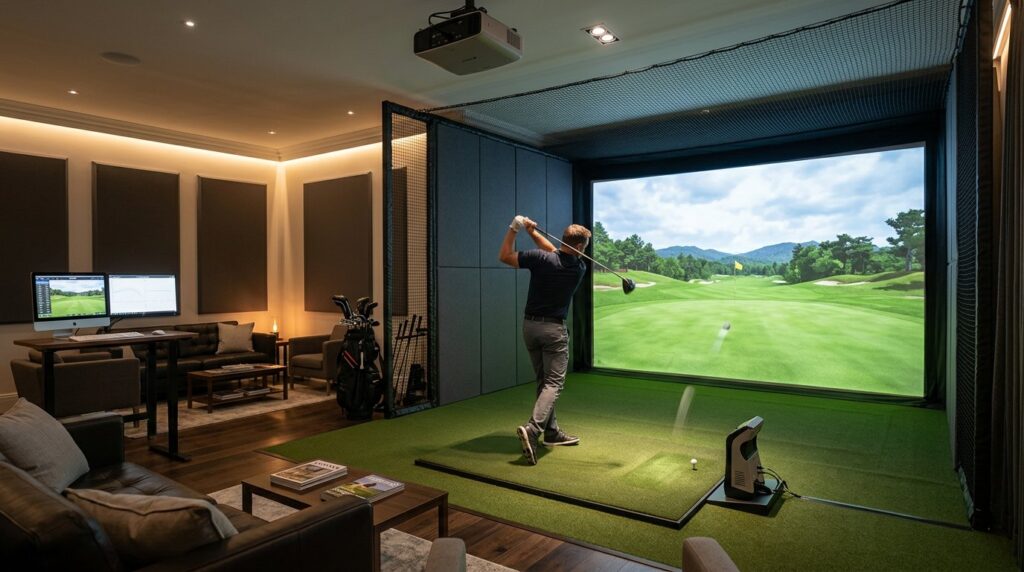
Golf no longer has to stop because the course is closed, daylight has disappeared, or bad weather has arrived. A virtual golf simulator combines shot measurement technology with software and a suitable hitting environment to create an indoor experience where players can practise, receive feedback, and play simulated courses. Systems range from portable launch monitors paired with a phone or tablet to dedicated rooms with impact screens, projectors, computers, cameras, and permanent hitting areas. Choosing the right setup depends on available space, measurement technology, software, desired accuracy, budget, safety, and whether the simulator is intended for entertainment, structured practice, coaching, or commercial use.
The most expensive installation is not automatically the most appropriate one. A golfer mainly interested in launch data may need little more than a compatible monitor and safe hitting area, whereas someone seeking an immersive course experience may value a large screen and projector.
Room dimensions also matter as much as electronics. If a golfer cannot comfortably make a full swing, additional technology will not compensate for an unsuitable space.
What Is a Virtual Golf Simulator?
A golf simulator is a combination of hardware and software that measures aspects of a golf shot and represents the result digitally.
The hardware typically includes a launch monitor or other tracking system. Depending on the device, it may measure or calculate information such as ball speed, launch angle, launch direction, spin, club speed, or other shot parameters.
Simulation software uses available data within its own physics model to estimate ball flight and display the shot in a digital environment.
More advanced setups add a hitting screen, projector, gaming computer, protective enclosure, high quality mat, and sometimes additional cameras or sensors.
How Does a Virtual Golf Simulator Work?
The process begins when the golfer strikes a ball within the system’s designated hitting zone.
Tracking hardware records information during the brief period around impact and initial ball flight. Cameras, radar, infrared technology, or combinations of sensing technologies may be used depending on the product.
Software processes that information to create the displayed shot.
Because products measure different variables and use different algorithms, systems can produce somewhat different results from the same swing.
Manufacturers should clearly identify which metrics are directly measured and which are calculated.
What Can a Virtual Golf Simulator Measure?
Common metrics can include:
• Ball speed
• Club speed
• Launch angle
• Launch direction
• Spin rate
• Spin axis or related directional data
• Carry distance
• Total distance
• Smash factor
• Club path
• Face angle
• Angle of attack
Not every system provides every metric.
Some values may also require additional hardware, marked golf balls, club stickers, subscription tiers, or specific setup conditions. Check exact product specifications rather than assuming a metric is included because a competing system provides it.
9 Virtual Golf Simulator Tips Before You Buy
Planning the room and intended use before selecting equipment can prevent expensive incompatibilities.
1. Choose a Virtual Golf Simulator Based on Your Main Goal
Start by deciding what you actually want the system to do.
A player focused on practice may prioritize reliable ball and club data. A family entertainment room may prioritize simple operation, course selection, graphics, and multiplayer features.
Golf instructors may require additional club information, video integration, or exportable session data.
Commercial operators have further concerns involving throughput, durability, licensing, maintenance, and technical support.
Defining the primary goal makes hardware comparisons more meaningful.
2. Measure Your Virtual Golf Simulator Space Carefully
Room dimensions are among the most important constraints.
Measure ceiling height, room width, room length, doors, windows, light fixtures, ceiling fans, furniture, and any structural obstacles.
Do not rely solely on nominal minimum dimensions found in a generic guide.
Golfers differ in height, handedness, swing plane, club length, and preferred hitting position.
Test the intended hitting area physically with an unloaded club before committing to the design.
3. Select Virtual Golf Simulator Tracking Technology Carefully
Launch monitors use different technologies.
Radar based systems often require particular distances between the device, golfer, and screen or net. Camera based systems may work within a more compact footprint but can have their own mounting, lighting, and hitting zone requirements.
Some systems sit beside the ball, while others mount overhead.
No tracking category is automatically more accurate in every environment.
Evaluate independent testing where available and check the manufacturer’s installation specifications for the exact model.
4. Plan Virtual Golf Simulator Safety Before Appearance
A simulator involves real golf clubs moving at high speed and real golf balls struck with substantial energy.
The room should provide sufficient swing clearance and contain misdirected shots appropriately.
Impact screens, side protection, ceiling protection, nets, and padding may be necessary depending on room geometry.
Keep spectators and fragile equipment outside the swing area.
Do not position televisions, windows, lights, or computers where foreseeable mishits can strike them.
Safety should influence the room design before decorative finishes are selected.
5. Match Your Virtual Golf Simulator Projector to the Screen
A projector needs to fit the geometry of the room.
Throw distance, lens characteristics, image resolution, brightness, aspect ratio, mounting position, screen dimensions, and potential golfer shadows all matter.
Short throw projectors are popular in simulator installations because they can create large images at shorter distances, but suitability depends on the specific model.
Use a projector manufacturer’s throw calculator or installation specifications.
Do not assume every projector can fill every impact screen from an arbitrary ceiling position.
6. Invest in a Good Virtual Golf Simulator Hitting Mat
A mat receives repeated club impacts and influences how the hitting area feels.
Extremely hard or thin surfaces may become uncomfortable during high volume practice.
Products vary in fiber construction, replaceable hitting strips, thickness, stance areas, and compatibility with different flooring.
No mat reproduces natural turf perfectly.
Look for a product designed specifically for golf impact and install it on an appropriate stable base.
Players experiencing persistent wrist, elbow, shoulder, or other pain should reduce aggravating activity and seek appropriate healthcare advice.
7. Check Virtual Golf Simulator Software Costs
Hardware price can be only part of long term ownership cost.
Some systems include basic applications but require subscriptions for advanced practice features, course libraries, multiplayer functions, or third party software access.
Check licensing terms before purchasing.
A software package available today may also change pricing, features, or supported hardware over time.
Commercial use can require different licensing from private home use, so businesses should not assume a consumer subscription authorizes paid public play.
8. Confirm Virtual Golf Simulator Computer Requirements
Some simulators operate with mobile devices or proprietary hardware, while graphically demanding software may require a capable Windows PC or another supported platform.
Check processor, graphics, memory, storage, operating system, and connectivity requirements.
For a new build, consider software requirements before buying the computer.
Running at higher screen resolutions can demand more graphics performance.
Also plan cable routes and equipment ventilation so electronics remain protected from golf balls and excessive heat.
9. Budget for the Entire Virtual Golf Simulator Setup
The launch monitor is not the whole project.
Potential costs include the enclosure, impact screen, frame, mat, projector, computer, cables, mounts, speakers, lighting, flooring, protective padding, installation, electrical work, and software.
Room remodeling can add significantly to the total.
Prepare an itemized budget before ordering.
This reduces the likelihood of buying premium tracking hardware only to discover there is insufficient budget for a safe, usable room.
Virtual Golf Simulator Space Requirements
There is no single room size suitable for every golfer or simulator.
Manufacturer requirements should always take priority because tracking hardware needs different operating distances.
Personal swing dimensions add another variable.
Virtual Golf Simulator Ceiling Height
The ceiling needs to accommodate the tallest intended golfer making a normal swing with the longest club they will use.
Published recommendations can provide an initial guide, but physical confirmation is important.
Be particularly careful around beams, lights, fans, ducts, and garage door mechanisms.
A club striking an overhead obstruction can injure the golfer and damage the room.
If a player subconsciously shortens the swing because of the ceiling, the simulator may also provide a poor representation of normal play.
Virtual Golf Simulator Room Width
Width needs to accommodate the swing and the desired hitting position.
A room that works for a right handed golfer from an offset mat might not accommodate a left handed golfer equally well.
Households with both left and right handed players should plan accordingly.
Central hitting can require more overall width but can improve flexibility.
Virtual Golf Simulator Room Depth
Depth depends heavily on tracking technology.
Radar systems may need meaningful ball flight before the screen plus appropriate distance behind the golfer for the device. Other technologies can operate from different positions.
The enclosure itself also needs depth to manage impacts safely.
Always use the exact hardware manufacturer’s room specification rather than relying on a universal simulator room diagram.
Virtual Golf Simulator Launch Monitor Technology
The launch monitor is the measurement core of most systems.
Its job is to capture reliable shot information within its designed operating environment.
Understanding what it actually senses helps buyers compare products more intelligently.
Radar Virtual Golf Simulator Systems
Radar can track motion by analyzing reflected radio signals.
Some golf radar systems track the ball over a meaningful distance and may also derive club information.
Indoor environments can create particular setup requirements.
The unit may need prescribed spacing behind the ball and sufficient ball travel toward the screen.
Metal objects or other environmental conditions may also influence recommendations for some devices.
Follow model specific guidance carefully.
Camera Based Virtual Golf Simulator Systems
High speed optical systems use cameras to observe the ball, club, or both around impact.
Because measurements can occur within a relatively compact area, camera systems can suit some indoor rooms where radar spacing is difficult.
Lighting and camera visibility can be important.
Some systems require specially marked balls or club stickers for particular data points.
Check whether accessories are included and whether they affect normal use.
Overhead Virtual Golf Simulator Tracking
Overhead units can keep measurement hardware away from the floor and out of the player’s immediate area.
This can be convenient for commercial installations and rooms used by both right and left handed golfers.
Installation is more involved because ceiling position and height matter.
Power, data connectivity, mounting strength, calibration, and protection should all follow manufacturer requirements.
Virtual Golf Simulator Accuracy Explained
Consumers often ask which simulator is “100 percent accurate,” but measurement equipment always has limitations.
Accuracy can vary by metric, shot type, environment, calibration, ball, software, and setup.
Manufacturers may publish accuracy specifications for particular measurements.
Improving Virtual Golf Simulator Data Quality
Install equipment exactly as instructed.
Level and align components where required. Use compatible balls and maintain appropriate lighting for optical systems.
Keep lenses, sensors, and radar areas unobstructed.
Software and firmware should also be kept current according to manufacturer recommendations.
If numbers suddenly appear implausible, verify setup and calibration before assuming your golf swing has dramatically changed.
Virtual Golf Simulator Carry Distance Versus Total Distance
Carry distance represents how far the ball travels before first ground contact, while total distance includes subsequent bounce and roll.
Indoor systems can model carry using launch information.
Total distance involves simulation assumptions about ground firmness, slope, weather, and other conditions.
For practice, carry data can therefore be particularly useful when comparing clubs.
Virtual total distance should not always be expected to reproduce a specific outdoor course result exactly.
Virtual Golf Simulator Screens and Enclosures
The impact screen performs two roles in an immersive simulator: it receives golf ball impacts and provides a projection surface.
Material needs to balance durability and image characteristics.
Repeated high speed impacts eventually create wear.
Choosing a Virtual Golf Simulator Impact Screen
Check the manufacturer’s recommended maximum use conditions and installation method.
Correct screen tension matters.
A screen that is excessively tight can increase rebound, while an inadequately supported screen can behave unpredictably or contact the wall behind it.
Provide the required space behind the impact surface.
Inspect the screen periodically for worn areas or damage that could affect ball containment.
Virtual Golf Simulator Side and Ceiling Protection
Mishits do not always travel toward the middle of the screen.
High shots, shanks, ricochets, and shots from inexperienced players need consideration.
Side curtains, enclosure panels, overhead protection, or suitable netting can reduce risk.
Design protection around realistic worst case misses rather than assuming every user will strike the ball consistently.
Virtual Golf Simulator Projector Selection
Projector specifications deserve careful planning because the golfer typically stands between the projector and the screen.
Poor placement can create shadows or expose the projector to impact.
Ceiling mounting is common where room geometry allows.
Virtual Golf Simulator Brightness and Resolution
Perceived image quality depends on projector brightness, room lighting, screen material, image size, resolution, and contrast.
A brighter specification does not automatically guarantee a better picture in every room.
Controlling ambient light can substantially improve visibility.
Resolution matters more on larger screens or when users sit relatively close.
Match the projector to the software output and intended screen size.
Virtual Golf Simulator Aspect Ratio
Common projection formats include 16:9 and other aspect ratios depending on software and room geometry.
The screen and projector configuration should work together.
A tall but narrow room may favor a different usable image area from a wide dedicated cinema style room.
Plan screen dimensions before finalizing projector placement.
Virtual Golf Simulator Software and Courses
Simulator software ranges from practice focused applications to realistic course libraries and entertainment games.
Different platforms support different launch monitors.
Compatibility should be confirmed before purchase.
Virtual Golf Simulator Practice Features
Useful practice functions can include virtual driving ranges, club data, shot dispersion, target practice, session histories, and bag mapping.
Golfers interested in improvement should focus on metrics they understand and can use.
Collecting dozens of numbers does not automatically improve performance.
A qualified golf coach can help interpret launch data in relation to swing goals.
Virtual Golf Simulator Course Play
Virtual course software models famous or fictional golf environments using digital terrain and physics.
Course availability can depend on licensing and software package.
Do not buy hardware based on an unofficial list of courses from an old review.
Check the current software provider’s catalogue and subscription requirements.
Updates can add, remove, or modify content.
Home Virtual Golf Simulator Setup
A home simulator can be installed in a garage, basement, spare room, garden building, or dedicated entertainment space when dimensions and construction are suitable.
Each location introduces different challenges.
Garages, for example, may have low door tracks or seasonal temperature changes.
Virtual Golf Simulator Garage Installation
Check ceiling mechanisms before measuring usable swing height.
Garage doors, motors, rails, storage racks, and lighting frequently occupy the exact space a club needs.
Heating, cooling, humidity, and electronics should also be considered.
Avoid unsafe modifications to garage door systems merely to create more swing space.
Use appropriately qualified trades when structural or electrical alterations are required.
Virtual Golf Simulator Basement Installation
Basements can offer controlled lighting but often present ceiling height limitations.
Measure below beams and services, not simply from finished floor to the highest point of the ceiling.
Moisture conditions also deserve attention.
Electronics and fabric impact screens should not be installed in spaces with unresolved damp or water intrusion.
Commercial Virtual Golf Simulator Considerations
Commercial installations have different priorities from occasional home use.
Equipment may operate for many hours per day and be used by golfers of different heights, skill levels, and handedness.
Durability and support become especially important.
Virtual Golf Simulator Business Planning
A commercial operator should consider hardware reliability, software licensing, reservation systems, staffing, food and beverage operations where relevant, maintenance, insurance, accessibility, and local business requirements.
Space planning should account for spectators.
People waiting for a turn need safe seating outside the club swing and ball impact area.
Commercial businesses should also confirm whether their simulator software permits commercial use.
Virtual Golf Simulator Maintenance for High Use Facilities
Create an inspection schedule.
Mats, screens, tees, balls, sensors, cables, projectors, mounts, and protective padding can all wear.
Replacing worn hitting surfaces before they fail can reduce disruption.
Cleaning optical sensors and maintaining software can also help keep measurement performance consistent.
Virtual Golf Simulator Costs
There is no single useful price because simulator configurations range from basic portable setups to custom room installations.
The final budget depends on desired experience.
A player can begin with a launch monitor and net before later adding projection.
Virtual Golf Simulator Cost Categories
Budget for tracking hardware, hitting surface, ball containment, display or projection, computer hardware, software, room preparation, electrical work, and accessories.
Subscriptions can create recurring costs.
Projector lamps or other replaceable components may also contribute to long term ownership expense depending on technology.
Compare total cost over several years rather than purchase price alone.
Virtual Golf Simulator Maintenance
Indoor equipment benefits from routine inspection.
Dirty lenses, damaged balls, worn mats, loose mounts, and screen deterioration can affect either performance or safety.
Check the hitting area before each session.
Maintaining Virtual Golf Simulator Equipment
Use cleaning methods recommended by each manufacturer.
Do not apply household cleaners to camera lenses, projector optics, or screen materials without confirming compatibility.
Inspect golf balls too.
Damaged or heavily marked balls can contribute to accelerated screen wear and may behave differently at impact.
Replace equipment when it no longer performs safely.
Common Virtual Golf Simulator Buying Mistakes
The most expensive mistake is buying technology before measuring the room.
Another is assuming that the advertised package contains every component required for operation.
Software subscriptions and computer requirements are also easy to overlook.
Virtual Golf Simulator Planning Mistakes
Do not position the golfer too close to walls or hard surfaces just to meet minimum sensor spacing.
Physical swing safety comes first.
Similarly, do not ignore left handed users if they will regularly use the room.
A well designed simulator needs to work for actual users rather than merely fit dimensions on paper.
Virtual Golf Simulator Technology Mistakes
Avoid comparing systems using one headline metric such as maximum distance accuracy.
Look at the measurements relevant to your practice goals and how the system performs indoors.
Check which values are measured versus calculated.
Independent testing, manufacturer specifications, warranty, software compatibility, and technical support can provide a more complete picture.
Frequently Asked Questions
What is a virtual golf simulator?
A virtual golf simulator uses tracking hardware and software to measure golf shots and display their estimated flight on a screen, monitor, television, or mobile device.
How much space does a virtual golf simulator need?
Space requirements depend on the golfer and tracking technology. Ceiling height, width, depth, hitting position and manufacturer specified sensor distances must all be checked.
How accurate is a virtual golf simulator?
Accuracy varies by device, metric, setup and environment. Proper installation and calibration are essential, and calculated results can differ between simulation platforms.
Can I install a virtual golf simulator in a garage?
Yes, when adequate swing clearance, tracking distance, electrical supply, temperature control and ball protection are available. Garage door hardware often needs consideration.
How much does a virtual golf simulator cost?
Costs range widely depending on the launch monitor, screen, enclosure, projector, computer, mat, software and room construction. Budget for the complete system.
Do I need a projector for a virtual golf simulator?
No. Basic setups can display results on a phone, tablet, monitor or television. A projector and impact screen create a more immersive course experience.
Conclusion
A virtual golf simulator can create a practical indoor environment for practice, entertainment, coaching, or simulated course play, but the best system depends on much more than graphics or launch monitor price. Room dimensions, tracking technology, impact protection, mat quality, software compatibility, projection, safety, and recurring costs should all be planned together. Measuring the room and defining the primary use before buying equipment can prevent many expensive mistakes. With appropriate installation and maintenance, a simulator can provide a convenient way to keep playing and analysing golf throughout the year.